New: The Menlo IRIS Browser Extension Makes Any Browser an Enterprise Browser. Meet IRIS
Details



The browser is now the gateway to nearly every business function, yet no single group owns its security. Each sees part of the problem and assumes the existing stack covers the rest.
Chrome Enterprise and Microsoft Edge for Business both have built-in controls, but each is specific to their own browser, and many organizations run both. Unfortunately, even enterprise-grade browser controls can't deliver zero-day exploit protection or file security with content disarm and reconstruction (CDR) because these threats require both context and an understanding of attackers. And if nobody is watching the browser, the first sign of trouble may be a breach or a data leak.
Security and IT teams know people use GenAI, but not which tools, which accounts, or what data is going into them. Shadow AI was involved in one in five breaches and added $670,000 to the average breach cost (IBM Cost of a Data Breach Report 2025), but blanket bans break workflows and drive helpdesk tickets.
Most teams can't even inventory the extensions that users have installed, let alone judge their risk. Extensions can be hacked, developer licenses stolen, or an extension bought by threat actors. But because updates arrive by silent push from the web store, neither you nor your users will know that a "good extension has gone bad" until it's too late.
The Menlo IRIS Browser Extension installs via the Chrome Web Store, MDM, Intune, JAMF, or other UEM tools, and enforces data protection, file security, web governance, threat prevention, and extension visibility right where work happens. All capabilities are managed from a single console, and it is easy to modify and change policy, deploy security to unmanaged and BYOD endpoints, and get protection without interrupting workflows. Users keep the browsers and tools they know, and they'll likely never notice Menlo IRIS until it stops an attack. Menlo IRIS works alongside your network, endpoint, and identity tools to fill the browser security gap, complementing the stack that you already have without the need to rip-and-replace anything.
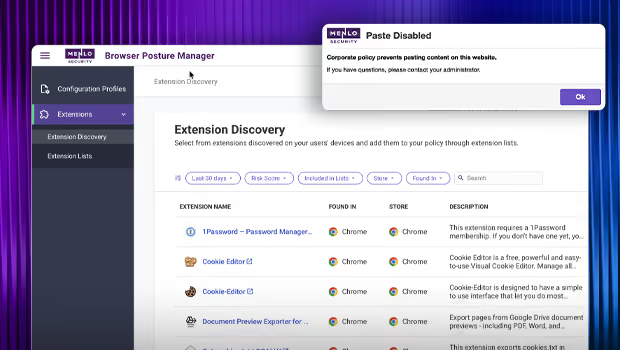
Menlo IRIS includes in-session browser data loss prevention at the point where users interact with data. Controls include copy/paste, upload/download, and read-only/read-write, as well as developer tools, print, camera, and microphone controls. File security includes hash checks, AV scanning, and cloud sandboxing, as well as dictionary-based data protection. Menlo IRIS also provides an inventory of third-party extensions across the enterprise, correlated with risk scores, while web governance features make it easy to apply domain and category controls. Centralized logging of every browser session by user, device, destination, and activity helps keep you audit-ready at all times.
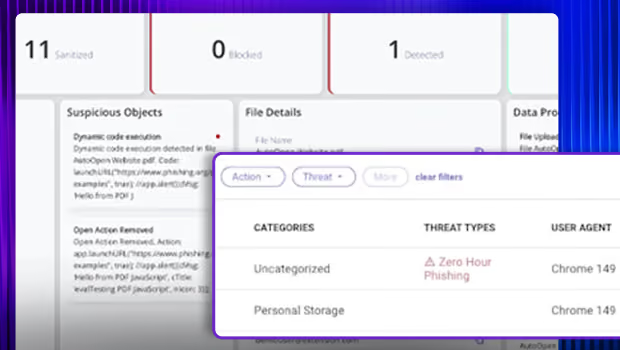
With Menlo IRIS, you can add unique security capabilities to the extension form factor. Get proactive protection against Highly Evasive Adaptive Threats (HEAT) with HEAT Shield AI, which catches and blocks phishing, social engineering, and malvertising attacks at click time — days before signatures are available. You can also add Menlo File Security with Content Disarm and Reconstruction (CDR), which removes embedded malware to deliver clean, fully functional files without disrupting workflows. And if your risk profile changes, Menlo gives you room to grow, with options for hybrid deployments that include full isolation.
Deploy Menlo IRIS through the Chrome Web Store, MDM, Intune, JAMF, other UEM tools, or managed browser controls. Configure it easily and go from proof of value to deployment quickly. There's no hardware to add and no browser to replace. Because users stay on their own browsers, each vendor's security patches reach them as soon as they're released.
Push policy through the tools you already use, manage everything from one console, and get logs for every event across managed and BYOD devices alike. Whether your security team is two people or twenty, you get meaningful browser security without taking on a time-consuming initiative.
Menlo IRIS adds browser-level visibility and control alongside your existing network, endpoint, and identity tools, without slowing users down. It fills gaps instead of duplicating controls, and it's built on Menlo's proven enterprise platform, which protects some of the world's most security-conscious organizations.
Discover why organizations around the world rely on Menlo Security to protect the enterprise and enable secure access to applications, preventing attacks that legacy security tools cannot stop.

"Menlo was easy to roll out and integrates well with our security and technology stack in the cloud.”

“To employees, Menlo is completely transparent, allowing users to navigate a completely functional web resource.”

“…allows Synapxe to protect its assets from malicious threats without impacting the native user experience.“

“I wanted a layered approach that would protect users from web-based threats without slowing down their ability to get work done.”

“The platform has decreased our remediation needs, while reducing patch pressure.”

“Menlo Security helped us eliminate the possibility of a malware infection, rather than just detecting and removing an infection.”
“Before, we had to manually examine every single potential malware problem. Now, my job is much easier…with the Menlo Secure Cloud Browser.”
“Menlo takes care of all the unknown risks running rampant around the internet.”
“Zero-client,easy scaling, and cloud provisioned versus appliance.”
“Menlo Secure Cloud Browser provided the scalability to ensure that users world wide have the same transparent experience and unyielding protection.”
“[Menlo has] eliminated the need to manually apply and update policies across an increasingly distributed IT infrastructure.”
“Menlo provides protection from email-based malware embedded in links and attachments without impacting the user’s native email experience.”
Menlo IRIS enforces protection directly in the browser session, so you can manage the everyday actions, files, extensions, and destinations your existing security stack can't see, without changing the browsers people rely on.

See which GenAI tools and sites are in use, steer people toward the ones that you sanction, and control what data can move into them—all without banning the tools people rely on or breaking workflows. Domain- and category-based policies apply to any web destination. When an action is blocked, users see why, so they file fewer helpdesk tickets.
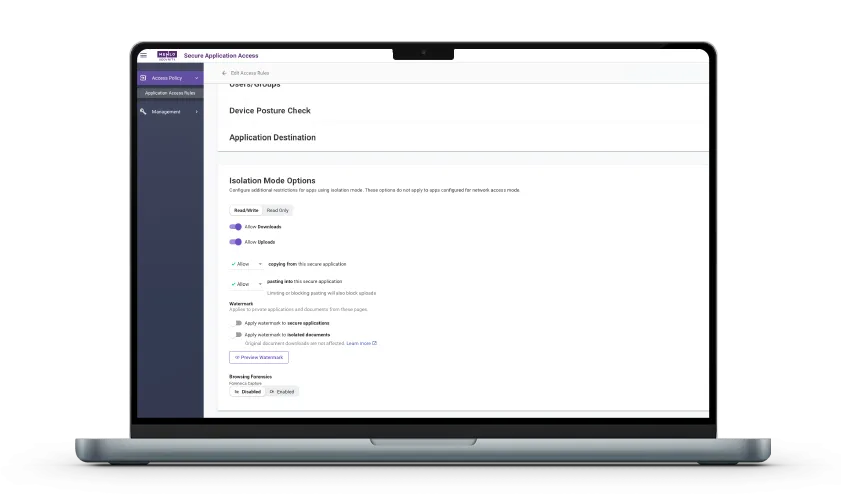
Copy, paste, upload, print, and screenshots are ordinary actions that most security tools never see. Menlo IRIS enforces clipboard, file upload/download, watermarking, print, read-only pages, developer-tools, and screenshot-deterrence controls in the session. Policies can be customized for different users, groups, domains, and locations.
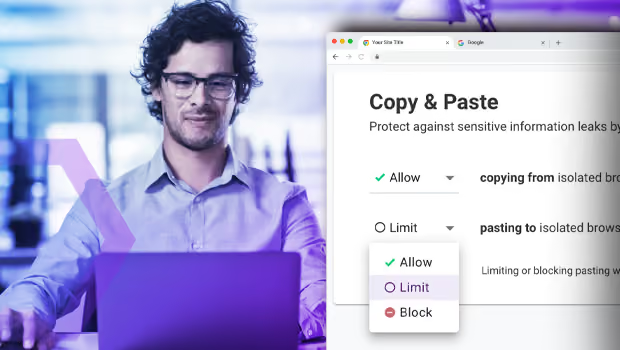

Inline dictionary- and regex-based DLP inspects content in files, while integrated hash checking, antivirus, and cloud sandbox analysis are applied to files automatically. Attackers embed links and exploits in files to evade common filters, so add Menlo File Security with Content Disarm and Reconstruction (CDR) to remove malicious content and deliver a clean, fully usable file instead of simply blocking it.
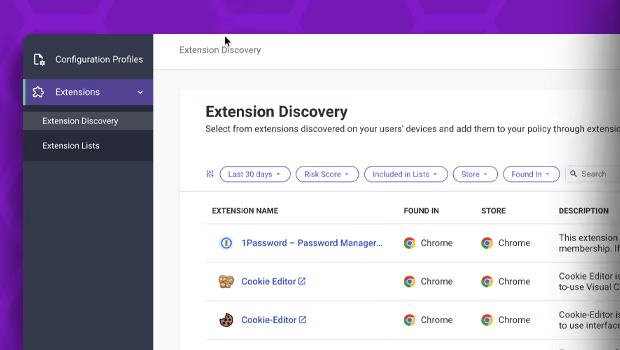
Extensions can be hacked, developer licenses stolen, or an existing extension purchased by threat actors. Extensions are updated silently from web stores, and neither you nor your users are notified, which means you won't know there's a problem until it's too late. Because Menlo IRIS lives on the endpoint, it maintains an enterprise-wide inventory of third-party extensions, with risk insight for each one.
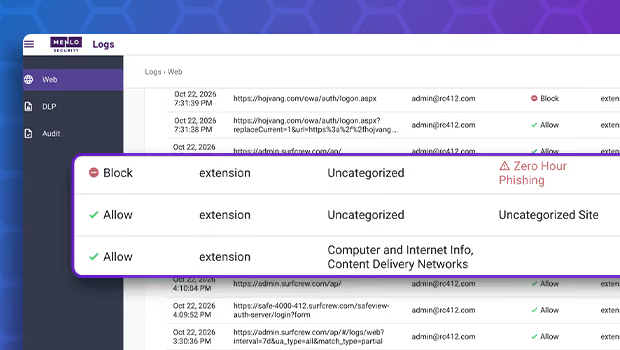
Most browser security tools rely on URL lists, signatures, and known indicators. The HEAT Shield AI add-on looks at what a page is actually doing, delivering real-time, intent-based detection that stops phishing, malvertising, and social engineering attacks before users can click on them.
Answers to the burning questions in your mind.


Menlo IRIS delivers enterprise-grade browser security, control, and visibility in a flexible, easy-to-deploy extension that works on the browsers your users already have. It enforces data protection, file security, web governance, threat prevention, and extension visibility right where work happens, all managed from a single console.
No. Menlo IRIS runs as an extension on the browsers your users already have, so there's no browser replacement or costly migration. Because users stay on their own browsers, each vendor's security patches reach them as soon as they're released.
Menlo IRIS deploys via the Chrome Web Store, MDM, Intune, JAMF, other UEM tools, or managed browser controls. Configure it quickly and go from proof of value to deployment fast, with no hardware to add.
Firewalls, secure web gateways, and EDR were built for the network and the endpoint, not for what happens inside a browser session. Menlo IRIS works alongside your existing tools to add the browser-level visibility and control they miss.
Every browser and extension event is logged and searchable. Centralized web logging covers user, device, destination, and activity. Teams working toward SOC 2, HIPAA, GDPR, and other requirements get the audit trail they need easily, without standing up a full SOC.
Take a self-guided tour to observe some of the ways that Menlo products enable secure app access, block sophisticated attacks, and provide critical insight into browsing sessions.
See exactly how Menlo can be tailored to solve your unique security challenges. We offer a live demo customized to your teamʼs goals, showing you how to secure your stack and protect your users. A truly secure browsing experience is one click away.