Menlo Closes the Loop on Zero-Day and AI Agent Attacks with New Google Security Operations Integration
Details



The universality of the browser in user workflows has made it the natural focus for attackers:
A Secure Enterprise Browser must address all of these issues comprehensively, while reducing operational complexity. The simple addition of RBI to legacy security tools, replacement browsers, and extensions alone have fundamental architectural disadvantages that fail to solve for the needs of the modern agentic enterprise.




The Menlo Secure Enterprise Browser is a unified solution that delivers architectural immunity to the enterprise, protecting against a broad spectrum of browser-borne attacks without adding to existing operational complexity. Evasive zero-day threats are neutralized, file-borne threats are removed, sensitive data is protected from exfiltration, secure application access is provisioned, and AI agents within the browser are constrained.
Menlo’s groundbreaking hybrid architecture enables local visibility, DLP controls, and secure application access through the Menlo Secure Extension, while high-risk browsing is examined and disarmed through the Menlo Cloud, giving the enterprise “right-sized” security that optimizes for both performance and security.
These policies extend to browsers with integrated browser agents as well, including Chrome and Edge. The Menlo Secure Enterprise Browser enables users to interact safely and productively with the agent while ensuring that data is not inadvertently exfiltrated, and that files containing malware and browser tabs with hidden prompt injection commands are neutralized.
With the Menlo Secure Enterprise Browser, this full suite of capabilities is deployed and managed through a single console with unified policies, visibility, and observability, with streamlined onboarding that enables new employees, contractors, and other third parties to be provisioned in minutes, without the need to deploy an agent or client.
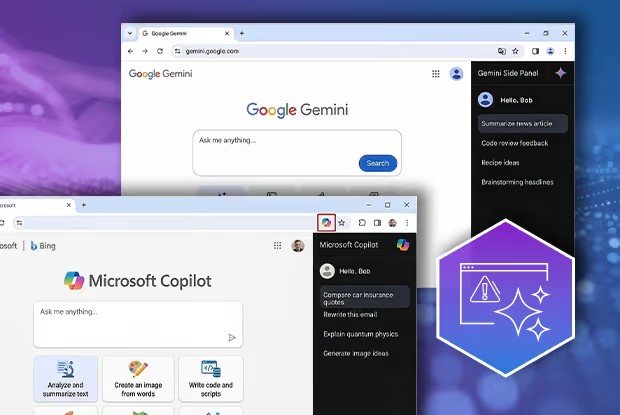
New browsers, including Google Chrome and Microsoft Edge, include browser agents in the form of sidebars by default. While these sidebars add productivity benefits, it is important to ensure that you are:
Due to the complex nature of browser agent security, and the lack of viable options to effectively secure these unmanaged agents, many organizations have elected to simplify them, which leaves them at a competitive productivity disadvantage. The Menlo Secure Enterprise Browser solves for all these challenges, allowing the enterprise to deploy browser agents with confidence that their data is protected and that the agent is not an open door to malware or other threats including prompt injection.

New productivity tools, including rich collaboration applications, GenAI, and browser agents, are rapidly expanding risks to your sensitive data and IP, because data loss is often inadvertent—users want to get their jobs done and sometimes don’t even know if they’re sharing sensitive content.
The Menlo Browser Security Platform takes the risk out of users interacting with sensitive data, with AI Adaptive DLP. AI Adaptive DLP delivers AI-driven, automated detection and masking, and is easily extensible to support masking for company-specific IP. Rather than blocking documents containing sensitive data completely, AI Adaptive DLP masks the sensitive data within documents, allowing collaborative workflows to continue. Data masking with AI Adaptive DLP is provided in real-time, easing extensive Data Access Governance and providing consistent controls to protect data in motion.
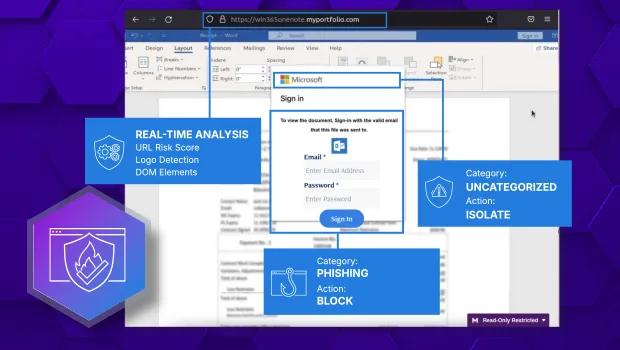
Attackers have long taken advantage of techniques including zero-day phishing, social engineering, malvertising, and malware embedded in files to provide initial enterprise access and facilitate credential theft via the browser. The advent of AI has enabled attackers to scale up the production of these threats, effectively industrializing the threat landscape.
Menlo HEAT Shield AI is a proactive, multi-layer defense that redefines browser security by stopping these zero-day exploits before they can do any damage. HEAT Shield AI’s high-efficiency model combines Menlo’s decade-plus of threat prevention experience to perform multimodal visual analysis of the entire web page, including domain/URL information and the page DOM, then combines it with Google Gemini's advanced Generative AI analysis. No other security solution on the market can provide the same deep integration and level of visibility, providing an unparalleled defense against today's most dangerous attacks.
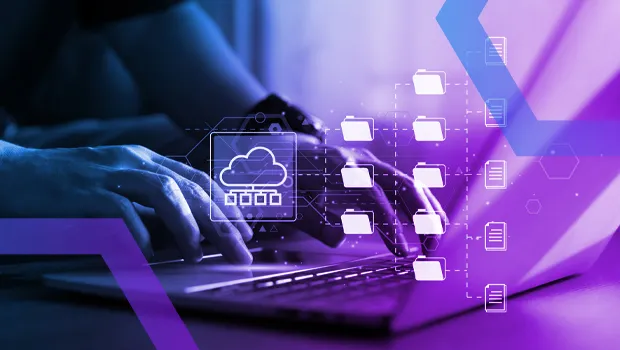
Embedding malware in files and archives, particularly those that are password-protected, is a time-tested attack vector that sneaks past standard defenses, particularly if the user is asked to download the file from a reputable store. The Menlo Secure Enterprise Browser stops these threats with automatic file sanitization that happens before the file hits the user’s endpoint. Menlo deconstructs files to their constituent elements across 220+ different file types, then reassembles the content on the fly, removing any harmful content. The result is files that are safe and malware-free, but retain full functionality.
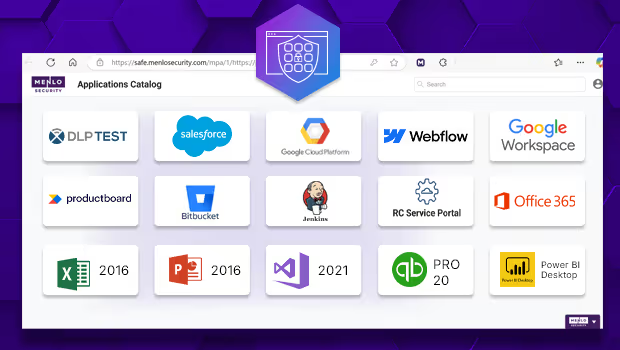
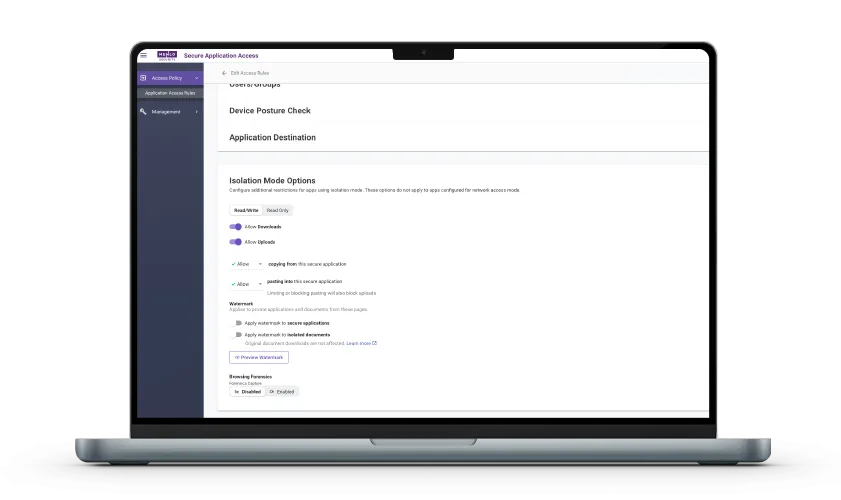
Menlo Secure Application Access moves beyond simple network access to enforce granular, least-privileged access for employees and contractors connecting through managed, unmanaged, and BYOD devices. SAA connects SaaS, private, and legacy thick-client applications through the browser, protecting applications and their data with DLP controls and file security. The result is safe, zero-trust use of SaaS, email, collaboration tools, and cloud storage, with unparalleled control over sensitive information. SAA delivers frictionless access that maintains a native user experience for both web-based and legacy applications, allowing organizations to onboard users in minutes instead of days and replace costly, cumbersome VDI infrastructures.

Menlo’s unified observability provides deep forensic intelligence that is impossible to achieve through disparate logs. Browsing Forensics delivers the full context of every session, ensuring that GenAI guardrails, threat analysis, and access policies all function correctly. SOC teams gain "video-like" recordings triggered by specific traffic categorizations, users, or DLP violations, offering an easy view into user actions.
Forensics Flow allows you to see what the user was doing before the triggering event, to go beyond user actions to infer intent. Browsing Forensics Resources delivers a code-level view of exploits like phishing - even after a page vanishes. This centralized, enterprise-wide visibility can also be applied to users accessing internal apps and content, delivering insider threat prevention and simplifying compliance.
Most users are familiar with the notion of browser extensions—those small pieces of code that add functionality to an “off-the-shelf” browser. Examples can include translations, writing assistance/grammar checking, productivity tools, password managers, and more, essentially enabling users to create the browsing experience that they want.
The unique Menlo architecture allows you to rewrite the internet for all your users, with Adaptive Web Modules. These modules are applied to user traffic as it passes through the hardened “digital twin” browser in the Menlo Cloud, giving you the functionality of an extension without the security risks or the hassle.
Most users are familiar with the notion of browser extensions—those small pieces of code that add functionality to an “off-the-shelf” browser. Examples can include translations, writing assistance/grammar checking, productivity tools, password managers, and more, essentially enabling users to create the browsing experience that they want.
The unique Menlo architecture allows you to rewrite the internet for all your users, with Adaptive Web Modules. These modules are applied to user traffic as it passes through the hardened “digital twin” browser in the Menlo Cloud, giving you the functionality of an extension without the security risks or the hassle.

Many Use Cases; One Point of Control
Menlo applies the right level of protection for all users on all devices and browsers, so users stay productive with frictionless workflows. The Secure Extension delivers native performance, data controls, and visibility for users browsing to trusted sites and apps. The Menlo Cloud features invisible, totally air-gapped protection for high-risk human web browsing and browser agent interactions as well as Secure Application Access to sensitive internal, SaaS, and legacy applications. The Menlo Secure Enterprise Browser also dramatically reduces helpdesk and support tickets, with file security that removes malware in real time so files are safe and fully functional, and AI Adaptive DLP that ensures that data remains available to users but sensitive details are masked automatically.
Reduce the Worry Caused by Alert Fatigue
HEAT Shield AI with Google Gemini delivers proactive defense against today’s evasive, polymorphic threats with full multimodal analysis of traffic in real-time. This reduces the overwhelming number of alerts that security teams must investigate by ensuring that attacks simply don’t happen. Menlo File Security thwarts another common attack vector by ensuring that malware embedded in files is removed and the file is reconstructed in real time, so the threat doesn’t make it to the endpoint. When further investigation is required, Browsing Forensics delivers the details that security and incident response teams need for complete understanding, without the need to reconstruct packets or interview users.
Without the Risk of Exfiltration
Users of all kinds - including agentic ones - need access to data to function. At the same time, it is vital that sensitive or proprietary data is not exfiltrated or leaked. Menlo AI Adaptive DLP masks data in files in real -time, so user workflows are maintained without risk.
You Can't Secure What You Can't See
To secure activities in the browser, you must be able to see them. The Menlo Secure Enterprise Browser gives you what you need, from at-a-glance dashboard views to Browsing Forensics’ video-like recordings of specific user sessions. You can easily get the details you need to manage user access, learn about attackers’ tactics, and meet compliance—all in one place.
The Capabilities You Need Without The Tool Sprawl
The Menlo Secure Enterprise Browser is the one solution that you need for all of your browser security challenges. That's because the Menlo solution is based on a secure browser platform, and all of the tools that you need are integrated, unified and extensible. The Menlo Secure Enterprise Browser goes far beyond.
Menlo Security Is the Only Enterprise Browser Company to Be Named a Leader and Outperformer in the GigaOm Radar Report for Zero-Trust Network Access (ZTNA)


Discover why organizations around the world rely on Menlo Security to protect the enterprise and enable secure access to applications, preventing attacks that legacy security tools cannot stop.

"Menlo was easy to roll out and integrates well with our security and technology stack in the cloud.”

“To employees, Menlo is completely transparent, allowing users to navigate a completely functional web resource.”

“…allows Synapxe to protect its assets from malicious threats without impacting the native user experience.“

“I wanted a layered approach that would protect users from web-based threats without slowing down their ability to get work done.”

“The platform has decreased our remediation needs, while reducing patch pressure.”

“Menlo Security helped us eliminate the possibility of a malware infection, rather than just detecting and removing an infection.”
“Before, we had to manually examine every single potential malware problem. Now, my job is much easier…with the Menlo Secure Cloud Browser.”
“Menlo takes care of all the unknown risks running rampant around the internet.”
“Zero-client,easy scaling, and cloud provisioned versus appliance.”
“Menlo Secure Cloud Browser provided the scalability to ensure that users world wide have the same transparent experience and unyielding protection.”
“[Menlo has] eliminated the need to manually apply and update policies across an increasingly distributed IT infrastructure.”
“Menlo provides protection from email-based malware embedded in links and attachments without impacting the user’s native email experience.”
Answers to the burning questions in your mind.


The Menlo Secure Enterprise Browser Platform is the single solution for all of the many issues that enterprises are contending with today. It provides security for all users (managed and third parties) on all devices (managed, BYOD, and unmanaged) with any browser (even those with agentic sidebars).
The Menlo Secure Enterprise Browser includes the Menlo Cloud, featuring complete isolation for risky traffic and sites, as well as the Secure Extension, which delivers visibility and control on the local endpoint. Menlo stops even zero day exploits that have no signatures or Indicators of Compromise attached to them, as well as detecting malicious sites from which these threats are delivered, with AI-driven threat prevention. AI Adaptive DLP automatically masks sensitive and proprietary data in real-time, so users can work with it safely, while browser DLP controls like copy/paste, upload/download, and more prevent data loss to web-based GenAI portals. File Security automatically stops malware, including novel ransomware, embedded in over 220+ files types while leaving the file fully functional. The Menlo Secure Enterprise Browser delivers granular secure zero-trust access to SaaS, internal and legacy applications across all user/device/browser profiles, without the need for aclient or agent. Complete visibility is ensured from at-a-glance dashboards to recordings of user sessions, and all features are enabled from a single, central admin console.
The Menlo Secure Enterprise Browser offers two types of protection —isolation via the Menlo Cloud, and visibility/control via the Secure Extension. The Menlo Secure Enterprise Browser platform delivers both, and you can deploy exactly what you need for every user and asset type. In use cases where the Menlo Cloud is a best fit, we create a dedicated tenant for you with a wide range of traffic steering options from your devices to your tenant. Tenant management is fast and easy: you can use our web-based graphical user interface, and for the most advanced organizations, you can use our API to update policies from your organizational automation. The Secure Extension can be pushed via the management tools that you currently use, or can be downloaded via extension stores or by invitation.
Because both the Menlo Cloud and the Secure Extension are controlled from the same admin console, you can mix-and-match, and you can change at any time.
Unlike replacement browsers, which force many users into unfamiliar browsers in which they spend most of their day, Menlo supports any browser, for any user, in any location. In addition, the Menlo Cloud architecture enables preemptive threat prevention that protects both the organization from web-borne threats and sensitive internal applications and data from dangers lurking on unmanaged endpoints. In contrast, replacement browsers can't stop certain types of threats that are allowed to arrive on and then infect the endpoint.
Perhaps as bad as the potential to miss certain threats, the leading replacement browser disables the Javascript Just-In-Time (JIT) compiler and Web Assembly (Wasm). This design decision breaks large, complex web apps that need a high-performance browser. Admittedly, JIT and Wasm are subject to attacks. The Menlo architecture is therefore superior to replacement browsers as these performance-oriented Chromium features remain enabled in the Menlo Cloud, with only safe HTML going to the endpoint for rendering.
While browser extensions generally (but not fully) enable users to continue to use their preferred browser (solving the primary disadvantage of replacement browsers), extensions face the same bleak challenge that replacement browsers do: they run on the endpoint, which is contested ground, discussed three questions above. Any browser vulnerability can compromise the endpoint, failing the task at hand. In contrast, by delivering preemptive security in the cloud, the Menlo Architecture overcomes contested endpoint risk.
Take a self-guided tour to observe some of the ways that Menlo products enable secure app access, block sophisticated attacks, and provide critical insight into browsing sessions.
See exactly how Menlo can be tailored to solve your unique security challenges. We offer a live demo customized to your teamʼs goals, showing you how to secure your stack and protect your users. A truly secure browsing experience is one click away.