Even the most innocuous browser downloads can introduce risk, whether they’ve come through trusted websites, encrypted connections, collaboration platforms, or other approved workflows. What’s worse? Even the familiar trust signals that enterprises have relied on for ages now provide little assurance about the safety of the content being delivered.
Compromised accounts, background transfers, browser extensions, and nested file content create less-visible paths for malicious files. Gaps across devices, applications, and transfer channels can also allow legitimate user-initiated downloads to bypass meaningful inspection.
This article explores six commonly overlooked download risks and explains how Menlo File Security inspects and sanitizes content before delivery.
While one employee logs into a familiar vendor portal and downloads a quarterly report, another saves a presentation shared through a collaboration platform. And yet, a third installs a browser extension recommended by a colleague. Each one of these actions is par for the course in a typical workday.
On top of it all, the vendor portal is known, the connection is encrypted, and the employee chose to begin the download based on previous trust. Each of those signals can establish confidence in the workflow, but they reveal very little about the content arriving on the device.
A file from a legitimate source can still contain a malicious macro, script, embedded object, exploit, or nested payload. A trusted portal may be compromised between sessions. A collaboration account may be taken over without an alert to be sounded. Sophisticated content can also evade traditional inspection while preserving the appearance and functionality the user expects.
Browser downloads should therefore be judged by their contents rather than by the familiarity of the site or the apparent legitimacy of the action. Security teams need controls that inspect and neutralize what is delivered before it reaches the endpoint, regardless of the route it followed.
The trust signals surrounding a download answer different questions.
HTTPS indicates that the connection is encrypted, while a familiar domain or authenticated portal may establish confidence in the source. However, neither one reveals whether the file itself is safe. Think of it this way: just because your carry-on baggage was deemed safe by TSA doesn’t mean it’s assumed safe on the way back. It’s checked every single time, no matter how many times you’ve taken it. The same rules must apply to files.
Traditional malware detection can certainly narrow the risks around browser downloads. However, new threats and evasive code may avoid known signatures that AV tools rely on, while password-protected archives and multiple nested layers can limit how deeply a file is inspected. Even then, blocking hard-to-inspect files often results in employee workarounds that create even more exposure to risk. This creates gaps between the assurances visible to the user and the risks concealed within the content they must interact with.
The following six download scenarios illustrate where that gap regularly leads to unexpected exposure.
Employees naturally place more confidence in files downloaded from websites they use regularly.
Familiarity can conceal several paths to compromise. Attackers may breach a website and replace a legitimate download, take over an authorized account, or abuse an upload feature to distribute weaponized files. Third-party components, software dependencies, and connected content repositories can also introduce unsafe files without the website owner realizing that anything has changed.
Because the download matches the user’s expectations, it is less likely to be scrutinized before being opened. Independent inspection must therefore extend to expected downloads from approved portals, familiar websites, and other sources the organization routinely trusts.
The classic padlock icon in a browser establishes that the connection is encrypted and associated with the certificate presented by the website. This protects information from interception or alteration in transit. Yet, it provides no assurance about the safety of the file as it travels beyond that connection.
Attackers exploit this distinction by hosting malicious content on reputable cloud storage services, content delivery networks, code repositories, and file-sharing platforms. These domains already carry significant trust, so organizations often permit connections to them through domain-based allowlists.
That creates a visibility gap. The allowlist recognizes the approved domain but may know little about the specific report, installer, archive, or document being transferred. A fully encrypted connection can still deliver a weaponized file.
HTTPS and domain reputation remain useful contexts, but the ultimate safety verdict must be based on an examination (and subsequent sanitization) of the file itself, including its contents and behavior, before it reaches the endpoint.
Some downloads arrive without a clear moment when the user chooses to retrieve a file. A website may initiate a transfer after an expected click, page interaction, redirect, or scripted event. Background processes can also retrieve temporary files, updates, installers, and supporting content with little indication that anything has been delivered to the device.
Without a visible download event, employees may never realize a transfer occurred. They cannot question an unexpected file or report activity they did not see. This also creates challenges for security teams. When telemetry is fragmented across browsers, endpoints, applications, and update services, an expected background transfer can be difficult to distinguish from malicious or unwanted activity.
Automated downloads and background transfers require the same scrutiny as visible downloads because they can carry malicious code, exploits, or unwanted software. Consistent inspection, policy enforcement, and visibility must cover files whether users knowingly retrieve them or they arrive through a background process. This also reinforces the practice of preventing malware at the point of click, rather than mitigation after the fact.
Collaboration platforms make shared files feel like part of an internal workflow. An employee receives a document in a team chat, finds a presentation in a shared workspace, or opens a spreadsheet synced from cloud storage. Familiar names and channels lower suspicion, even when the file’s origin is unclear.
Each time a file is reshared, renamed, copied, or moved between channels, its connection to the original sender becomes harder to trace. A file that began outside the organization may soon appear indistinguishable from one created internally. Even more, a popular collaboration platform can instill a sense of trust that hasn’t been earned.
For this reason, platform approval alone cannot establish a file’s safety. Protection needs to follow content across channels, platforms, and file changes, inspecting and neutralizing unsafe elements wherever the file moves.
A file transfer can occur outside the organization’s inspection path. Personal browsers, unmanaged devices, remote work environments, direct-to-cloud transfers, and applications outside the standard security stack can all create coverage gaps.
Even when a security tool detects the download, it may be unable to fully inspect it. Password-protected files, compressed archives, uncommon formats, and large files may exceed technical capabilities or established inspection policies. Detection tools may release a file when the available evidence is inconclusive. More restrictive controls may block it entirely, prompting the employee to find another way to complete the transfer.
These outcomes point to an architectural coverage problem. Employees are completing expected business tasks using the available options, while protection is applied inconsistently across download paths. Closing these gaps requires inspection and policy enforcement that follow the file across users, devices, applications, and transfer paths.
A browser download does not always begin with the webpage itself. Extensions can access page content, change browser behavior, and retrieve software or updates from third-party infrastructure. Even a legitimate extension can introduce risk if an attacker compromises its distribution account, a malicious update enters its supply chain, or ownership transfers to an untrustworthy operator.
Other page components create similarly indirect paths. Embedded advertisements, frames, widgets, and document viewers may load content from external services or initiate downloads without sending the user to another website. The visible page may be trusted even if the component delivering the file comes from elsewhere.
The complexity can continue inside the download. A document may contain embedded files, Object Linking and Embedding (OLE) objects, scripts, or macros. Compressed archives can conceal additional files across several nested layers.
Effective inspection must trace this entire content chain. Security controls must examine extensions, embedded delivery mechanisms, nested files, and active elements before any part of that content reaches the endpoint.
This is why Menlo File Security intercepts, inspects, disarms, reconstructs, and delivers analytics on each file that attempts to cross enterprise endpoints.
Protecting browser downloads begins with consistent coverage. Applying different standards at different steps only helps to create gaps that attackers can, and do, exploit. This is especially true as attackers leverage generative AI to ramp up their attack sophistication and frequency.
Every file should be treated as untrusted until its contents have been evaluated. The domain’s reputation, an encrypted connection, or a user’s decision to download provides context, but none of these establishes that the file is safe. Inspection must reach beyond the outer format to examine compressed archives, password-protected files, embedded objects, macros, scripts, and less common file types.
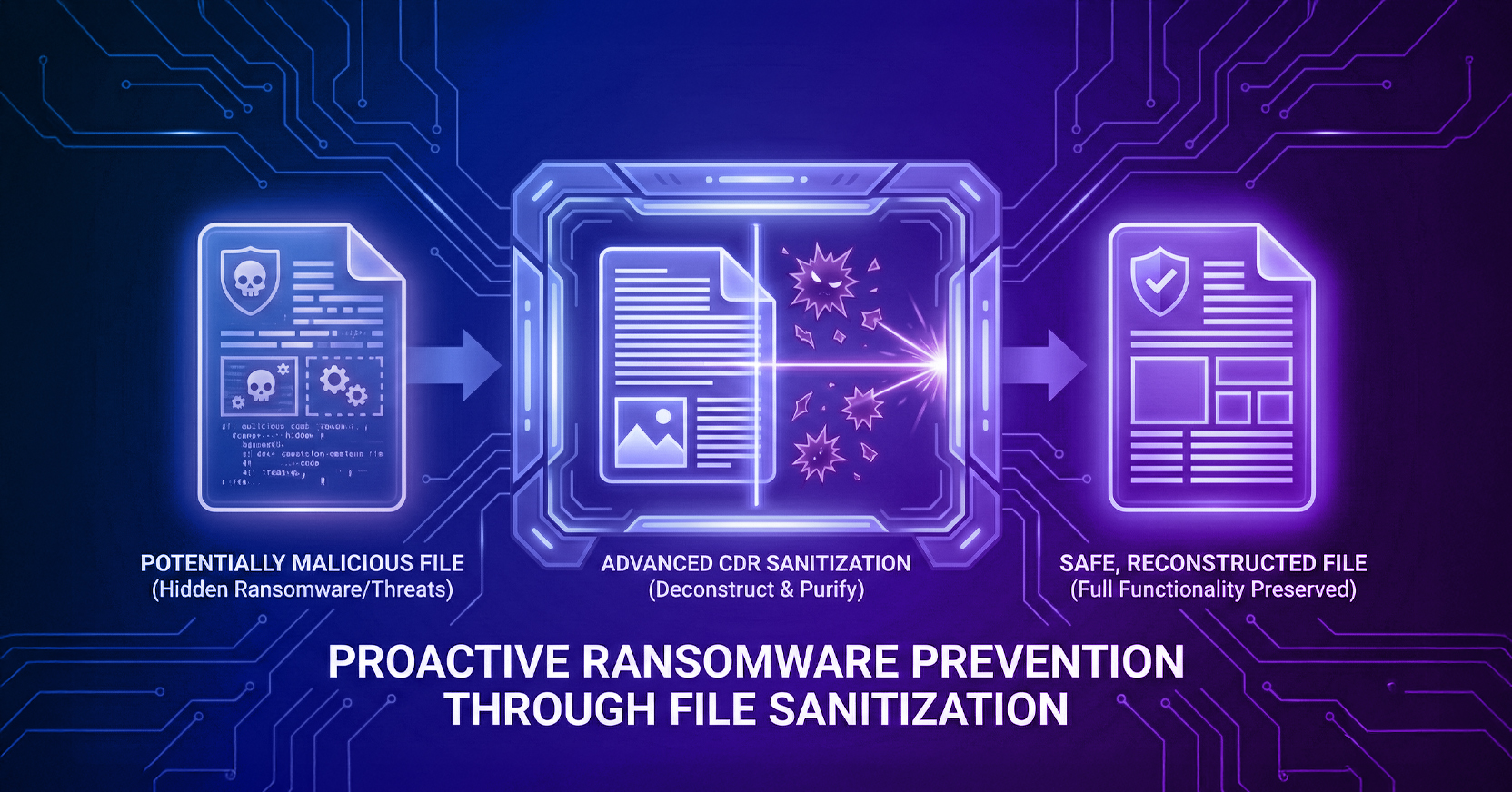
When risky content is found, the response should preserve the business task whenever possible. File sanitization (also known as CDR) can remove unsafe elements and reconstruct a clean version before delivery. Done well, this process retains legitimate formatting, business logic, and functionality, allowing employees to use the file without resorting to blocked workflows or unapproved transfer methods.
Security teams also need centralized control and telemetry across the full download path. That includes visibility into frequently targeted users, common file types, attempted threats, and channels where coverage remains incomplete. These capabilities extend existing endpoint, network, and detection investments by stopping more file-borne threats before execution and providing useful context about the activity that those tools still need to investigate.
Menlo File Security inspects files as they move through everyday business channels, such as browser downloads, and sanitizes suspicious content before delivery. Hidden threats are removed while the useful content, formatting, and functionality employees need remain available. The employee can open the file and continue working without additional warnings, delays, or security decisions.
Behind that experience, security teams retain centralized policy control and visibility into the files inspected, threats prevented, and activity occurring across the organization. Together, these controls reduce download risk while keeping legitimate work moving.
Dive even deeper into Menlo File Security or reach out for a demo of its capabilities in action.
Menlo Security