Threat actors continue to abuse trusted brands and cloud services to slip past traditional security controls. While DocuSign impersonation is common, the infrastructure and delivery mechanisms attackers use to get a payload onto the endpoint are growing more layered.
Menlo LABs recently identified and blocked a web campaign that combined a fraudulent DocuSign workflow, a Florida healthcare background-screening lure, and deceptive cloud infrastructure to silently deploy a ConnectWise ScreenConnect Access client.
Because Menlo classified the site as Zero Hour Fraudulent at the web entry point, the attack was stopped before any payload reached the user's device. This post walks through the full attack chain, including the social engineering lure and the highly obfuscated execution steps the attacker would have relied on had the attack not been blocked at the web layer.
Menlo LABs intercepted a fraudulent web campaign impersonating DocuSign. The attacker used a Florida healthcare and background-screening narrative to persuade users to download a malicious archive. To increase perceived legitimacy, the landing page was hosted on Cloudflare Pages and included a fake Cloudflare-style verification workflow.
Based on the DocuSign impersonation, the deceptive verification flow, the suspicious infrastructure, and the malicious download intent, Menlo classified the site as Zero Hour Fraudulent at the web entry point.
Blocking the attack at the web layer prevented a complex downstream endpoint execution chain. Subsequent analysis revealed that the blocked site attempted to deliver a ZIP archive containing a malicious HTA file, Florida Background Screening Notice.hta.
Had it executed on the endpoint, this attack would have combined web impersonation, cloud-hosted payload delivery, native Windows tooling (living-off-the-land techniques), defense evasion, and the abuse of legitimate remote-access software.

Figure 1: End-to-end attack flow from the fraudulent DocuSign impersonation to the attempted unauthorized ScreenConnect deployment.
The attack begins at floridalicense.pages[.]dev/floridahealthcarescreeningnoticeforlicenseholders. This Cloudflare Pages-hosted page is designed to resemble a legitimate document-delivery workflow.
The page prominently features DocuSign branding and tells the user that a Florida healthcare and background-screening notice is ready for download. Before the user can download the document, they are forced to interact with a verification sequence styled to resemble a Cloudflare security challenge.
The attacker combines three distinct trust-building elements:
The victim must actively complete the verification workflow to start the download. That makes social engineering the foundation of the attack, rather than a passive drive-by execution.
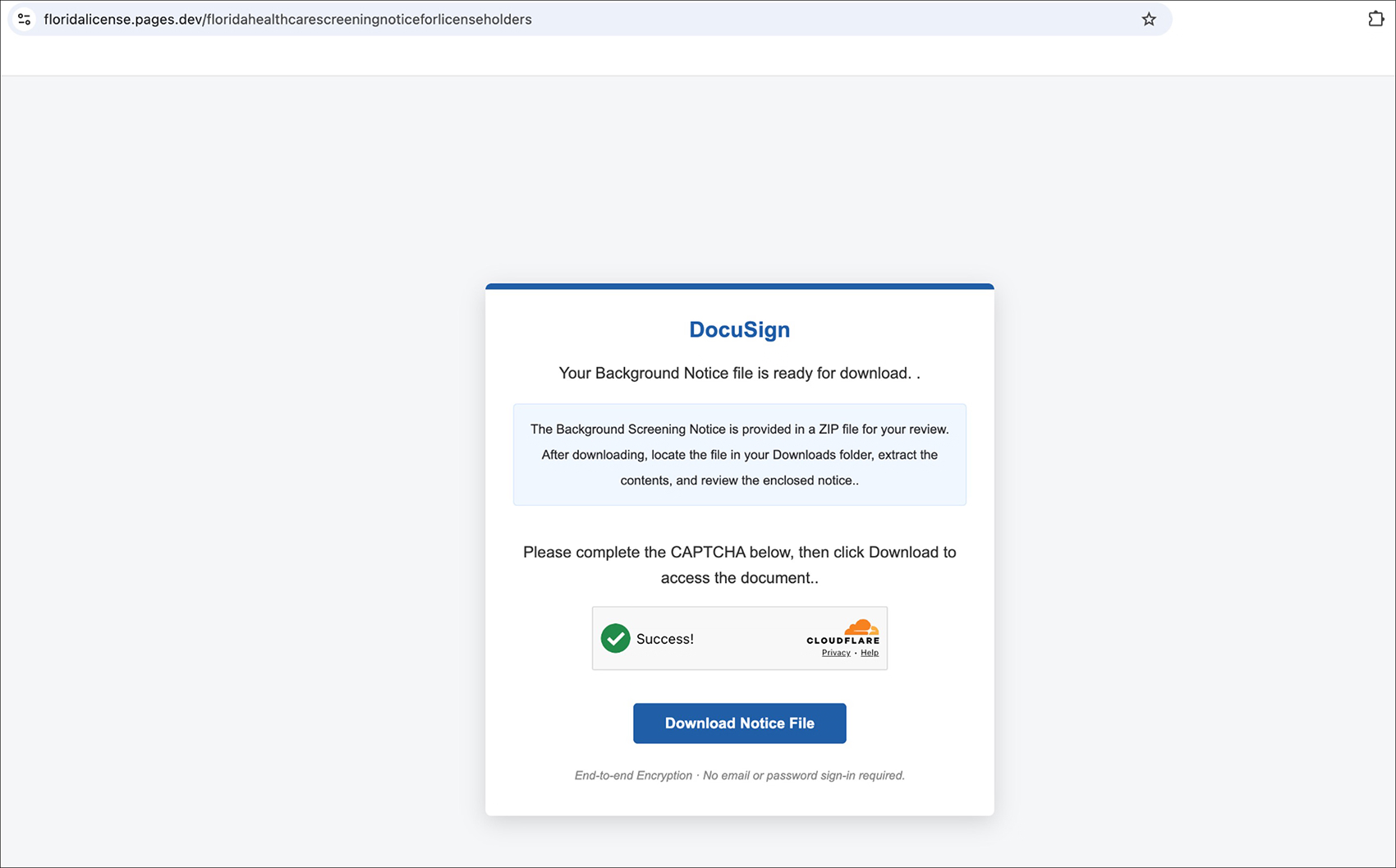
Figure 2: Fraudulent DocuSign-themed Florida Background Screening Notice page hosted on Cloudflare Pages.
Menlo Security did not need the downstream HTA payload to execute in order to determine the web session was unsafe. Menlo's LLM-assisted analysis engine identified the fraudulent behavior directly from the webpage itself:
“The webpage impersonates DocuSign and presents a fake Cloudflare verification to trick users into downloading a ZIP file, likely containing malware, to gain unwanted system access. The URL is hosted on a suspicious domain and is not associated with DocuSign.”
Menlo Security LLM-assisted analysis engine
The analysis recognized that the page was hosted on unrelated infrastructure with zero legitimate association to DocuSign. This early intervention matters because the entire downstream endpoint chain depended entirely on the victim successfully interacting with the web page.
When a victim passes the fake verification and selects "Download Notice File," the Cloudflare Pages-hosted landing page sends an HTTP POST request to a secondary domain: docusig-document-sign6702.docusign-sign.workers[.]dev/download.
That request routes to a separate Cloudflare Workers endpoint responsible for returning the archive. Browser network analysis confirmed that the endpoint responds with an HTTP 200 OK, a Content-Type of application/zip, and a Content-Disposition header directing the browser to save the content as a ZIP file.
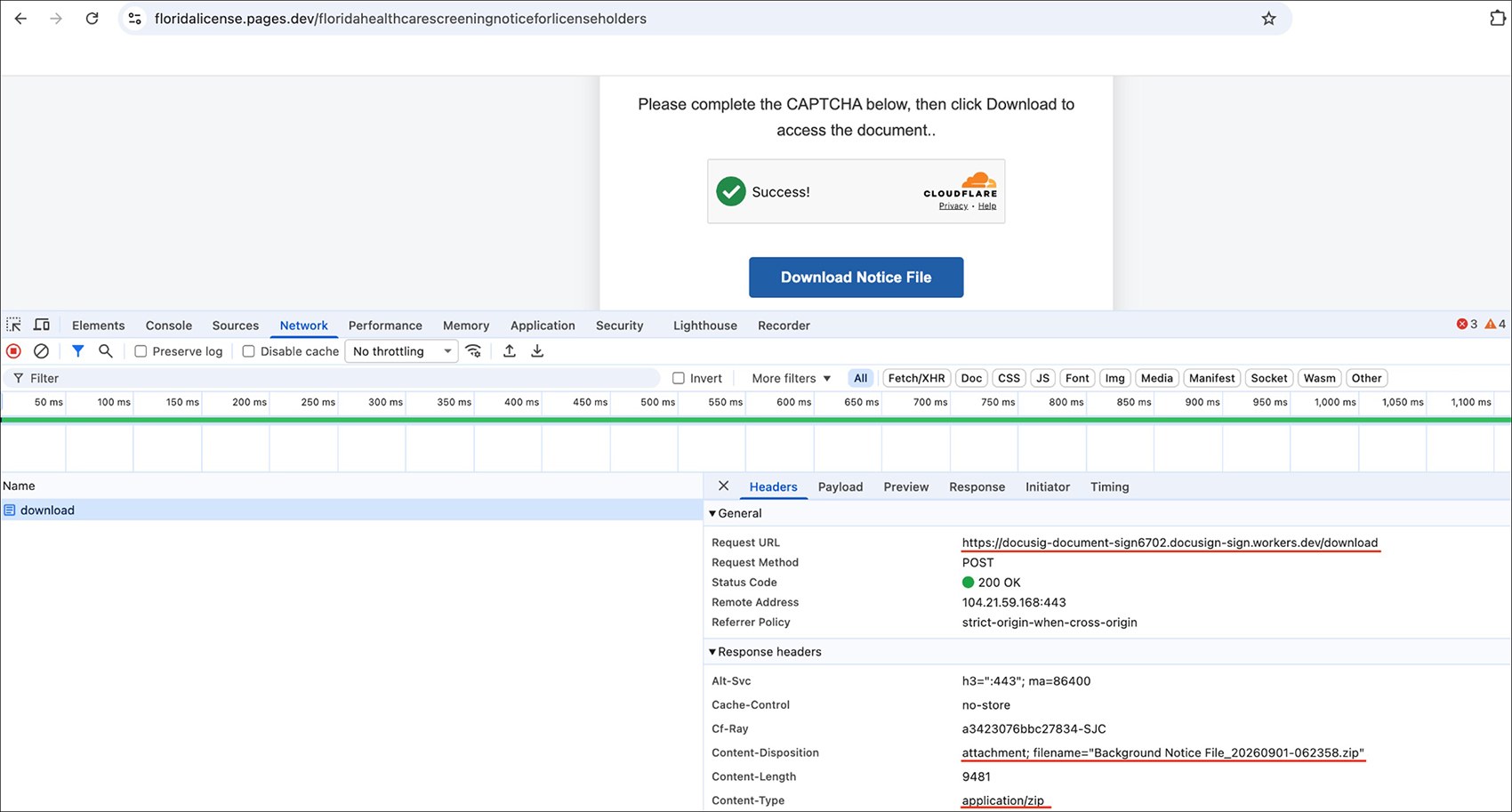
Figure 3: POST request to the Cloudflare Workers endpoint returning the malicious ZIP archive as an application/zip attachment.
The attacker deliberately separated the lure infrastructure from the payload infrastructure. Based on the observed network behavior, this activity is classified as cross-origin, script-triggered ZIP delivery. Because the ZIP is returned directly by the remote Workers endpoint, the available evidence does not support classifying the activity as HTML smuggling.
The downloaded ZIP archive contains a single file: Florida Background Screening Notice.hta (SHA-256: 1d5ab21ee92e4212ece319a383dd7593e3b4a998df135bfefc7fad7874c90587).
If the victim extracts the archive and opens the HTA, Windows executes it through the native mshta.exe binary. That transitions the attack from a browser-delivered web threat into native Windows execution.
Static analysis of the HTA reveals a large, Base64-encoded secondary VBScript. The first-stage script uses Windows COM objects, specifically Msxml2.DOMDocument.3.0 and ADODB.Stream, to decode the embedded content. Once decoded, the resulting script is dynamically executed using ExecuteGlobal. This runtime-decoding mechanism keeps the core operational logic out of plaintext in the outer HTA, complicating standard static inspection.
Immediately after decoding the secondary stage, the HTA displays an Adobe-themed graphical interface to the victim. Observed strings reference Adobe Acrobat, "Opening Document with Adobe PDF Reader," and "Checking PDF Florida Health License Renewal."
This interface is not necessary for the technical operation of the ScreenConnect deployment. It functions purely as a visual decoy, reinforcing the expectation of a healthcare document while system-level malicious activity happens in the background.
While the fake PDF reader loads on the screen, the decoded VBScript checks whether it is running with administrative privileges by attempting to access HKEY_USERS\S-1-5-19\Environment\TEMP.
If sufficient privileges are unavailable, the HTA relaunches itself using ShellExecute, calling mshta.exe with the runas verb. Windows then presents a legitimate User Account Control (UAC) prompt requesting administrator approval.
This is not a UAC bypass. The attack explicitly requests elevation and depends on the victim approving the prompt. If accepted, the HTA continues execution within an elevated administrator context.
Once running as an administrator, the script attempts to weaken Microsoft Defender SmartScreen configuration through the Windows Registry.
The exact effectiveness of these changes varies depending on the Windows version and enterprise policy enforcement, but the explicit intent is to weaken Windows security controls before or during the subsequent payload deployment.
With defenses weakened, the HTA attempts to retrieve a ConnectWise ScreenConnect MSI installer from admin.rshiahub[.]com/Bin/ScreenConnect.ClientSetup.msi.
The installer URL contains specific deployment parameters, including e=Access and y=Guest. The Access configuration is notable because ScreenConnect Access is designed to provide unattended remote connectivity.
To fetch the file, the script first attempts to use the native Windows curl.exe utility, saving the payload as %TEMP%\Installer.msi. The command uses the -L flag to follow redirects and the -k flag to bypass normal TLS certificate validation. If the curl method fails, the HTA contains a fallback mechanism using PowerShell and System.Net.WebClient.DownloadFile().
After the MSI is retrieved, the script launches msiexec.exe with arguments equivalent to msiexec /i "%TEMP%\Installer.msi" /qn /norestart.
The /qn parameter suppresses the normal Windows Installer interface, so the ScreenConnect client installs silently without presenting a standard installation wizard.
ConnectWise ScreenConnect itself is legitimate commercial remote-access software. The malicious nature of this incident comes from how the product is deployed: through a fraudulent web lure, obfuscation, privilege elevation, and silent installation. The appropriate classification is unauthorized RMM deployment.
The HTA also downloads a PDF file named f1040.pdf from Dropbox and saves it to C:\ProgramData\f1040.pdf. The script marks the file as hidden and then opens it for the victim.
From the victim's perspective, a document finally opens successfully. In reality, the ScreenConnect Access client has already been installed in the background, granting the attacker persistent remote access. The decoy PDF acts purely as a distraction to reduce suspicion.
The attacker relied on a convincing impersonation page, trusted cloud-hosting infrastructure, native Windows utilities, and legitimate remote-access software. Many of these components can look benign when viewed independently on an endpoint.
Correlating the web behavior with the user-deception context let Menlo Security identify the threat from the web session itself. The combination of DocuSign impersonation, a fake Cloudflare verification workflow, suspicious hosting infrastructure, and malicious download intent provided sufficient evidence to classify the webpage as Zero Hour Fraudulent before the downstream payload chain could begin.

Figure 4: Menlo Security classification of the fraudulent DocuSign impersonation site as Zero Hour Fraudulent.
The key security outcome is that Menlo Security disrupted the attack at the web entry point, ensuring the threat was neutralized before endpoint compromise could occur.
| Type | Indicator | Context |
|---|---|---|
| Landing URL | floridalicense.pages[.]dev/floridahealthcarescreeningnoticeforlicenseholders | Fraudulent DocuSign and background-screening lure |
| Payload Delivery URL | docusig-document-sign6702.docusign-sign.workers[.]dev/download | Cloudflare Workers ZIP delivery endpoint |
| HTA SHA-256 | 1d5ab21ee92e4212ece319a383dd7593e3b4a998df135bfefc7fad7874c90587 | Analyzed HTA file |
| Domain | admin.rshiahub[.]com | ScreenConnect deployment infrastructure |
This incident illustrates why web-layer detection is critical for modern intrusion chains.
See how Menlo secures the browser against fraudulent web lures before any payload reaches the endpoint. Schedule a Demo Here.
Menlo Security