Files are the one thing every business process still depends on. Contracts arrive from vendors, resumes arrive from candidates, invoices arrive from partners, and customers upload identity documents into intake portals. None of that is optional work, and all of it involves accepting a file from someone outside your organization.
That dependency is exactly why attackers keep using files as the delivery mechanism. A malicious document does not have to defeat your perimeter. It only has to look like the kind of file your people open every day. That is why detection-based tools keep missing them, and why blocking files outright was never a workable answer.
Cybercriminals hide malicious code inside ordinary business documents to bypass perimeter defenses. Compiled from the IBM X-Force Threat Intelligence Index 2026, the Verizon Data Breach Investigations Report, and ESET threat research, the top 10 evasive file threats include:
Large supply chain and third-party compromises have nearly quadrupled since 2020, as attackers increasingly target the environments where software is built and where partners exchange files. Source: IBM X-Force Threat Intelligence Index, 2026
Traditional security tools miss these threats because they are built to recognize what is already known, and an evasive file is designed to be unfamiliar. Antivirus, endpoint detection and response, and legacy data loss prevention all share the same architectural limitation. They are detection-based, meaning they block threats with recognized signatures and let zero-day permutations through.
There is a second problem underneath the first. These tools operate on the endpoint, which creates an exposure window where the file must reach the device before anything inspects it. By the time a verdict exists, the file is already where you did not want it.
The practical result is a choice nobody wants to make. Faced with a file they cannot confidently classify, these tools either allow it and accept the risk, or quarantine it and break the workflow. Neither option is security. Both are a coin flip dressed up as a policy.
Year-over-year increase in active ransomware and extortion groups, as leaked tooling and established playbooks lower the barrier to entry for new operators. Source: IBM X-Force Threat Intelligence Index, 2026
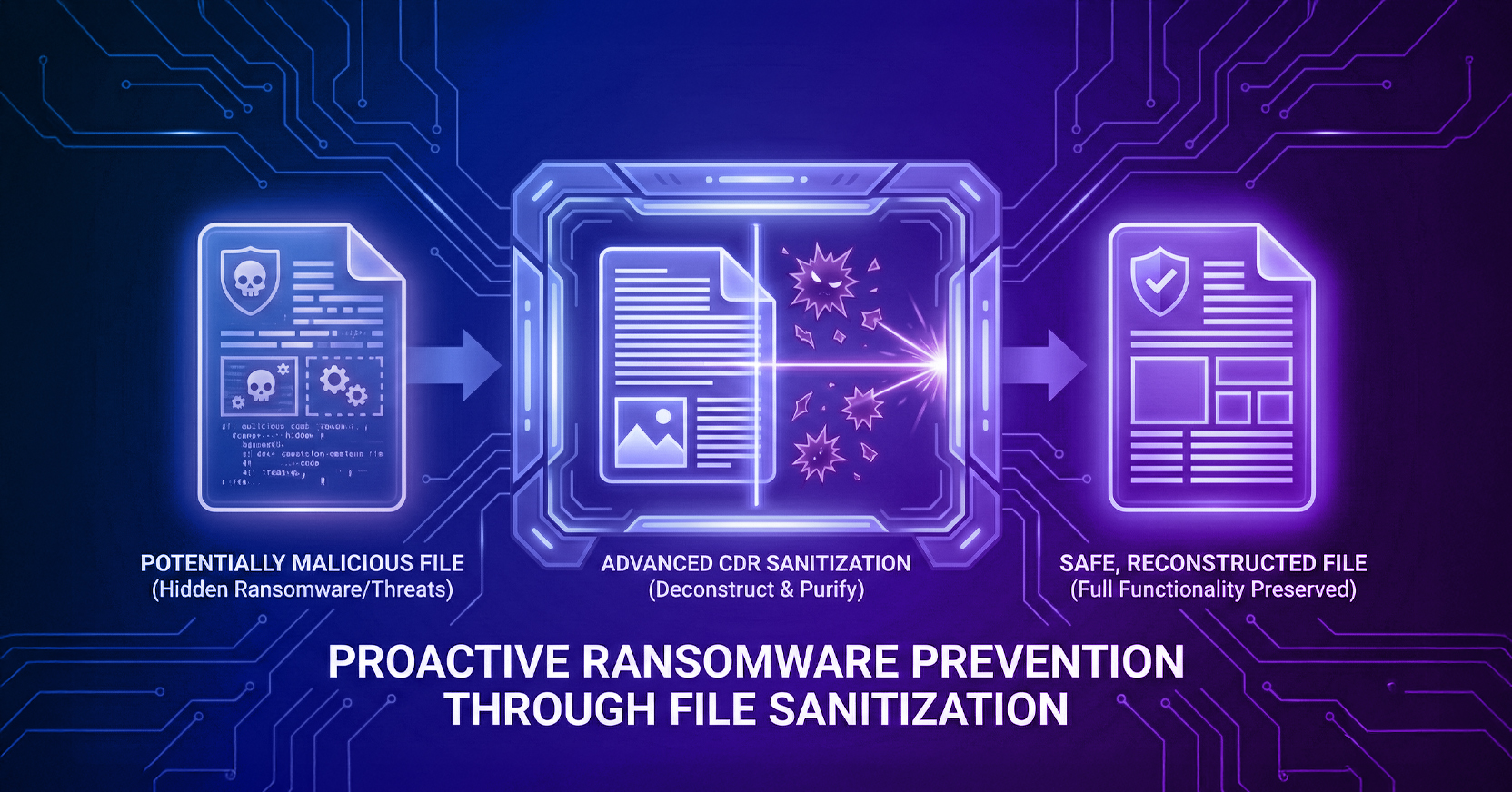
Content Disarm and Reconstruction inverts the question. Rather than asking whether a file is malicious, it assumes every file is and rebuilds it from components known to be safe. That difference shows up across every dimension that matters operationally.
| Capability | Traditional AV and EDR | Menlo File Security (Next-Gen CDR) |
|---|---|---|
| Threat Methodology | Detection-based. Scans for known signatures and heuristics, so zero-day malware passes through. | Zero trust. Assumes every file is malicious, then deconstructs and rebuilds it using only known-good components. |
| File Fidelity | Flattens complex files into unusable documents, or blocks them entirely. | Preserves full functionality. Safe macros and essential active elements remain intact. |
| Archive and ZIP Handling | Struggles with recursive scanning of encrypted or multi-layered archives. | Natively inspects and sanitizes over 220 file types, including password-protected archives. |
| Zero-Day Coverage | Requires a signature or a behavioral match that does not yet exist for a novel variant. | Works on first encounter, because sanitization does not depend on recognizing the threat. |
| Effect on the Business | Forces a choice between blocking legitimate files and admitting unverified ones. | Removes the choice. Files arrive usable and sanitized, so security does not become a workflow tax. |
Menlo File Security stops hidden file threats using Positive Selection® technology, which intercepts files in the Menlo Cloud before they reach the endpoint. Each file is broken down to its core elements, any unsafe or unknown code is stripped away, and the file is rebuilt using only verified components.
The distinction that matters is where this happens. Sanitization occurs before delivery rather than after arrival, so the endpoint never holds the original file. File Security is one capability of the Menlo Secure Enterprise Browser, which pairs cloud isolation for high-risk traffic with local visibility and control. That also means the protection extends to uploads, which is where the supply chain and data lake threats in the list above actually live. Most file security stops at what comes in. The channels attackers are using increasingly run in both directions.
What are evasive file threats? Evasive file threats are malicious payloads hidden inside everyday business documents, including Word files, PDFs, images, and ZIP archives, specifically constructed to bypass detection-based perimeter defenses.
Why do traditional security tools fail to stop these threats? Legacy antivirus, endpoint detection and response, and traditional data loss prevention are detection-based, so they rely on recognizing known signatures. They cannot identify zero-day permutations, and they struggle to inspect password-protected files or recursively scan complex archives. These techniques belong to a broader category of highly evasive adaptive threats built specifically to defeat detection.
What is Content Disarm and Reconstruction (CDR)? CDR assumes every file is a potential threat rather than trying to detect known bad code. It breaks each file down to its core elements, removes anything unsafe or unknown, and rebuilds the file from verified components before it reaches the user.
Will Menlo File Security break my macros or alter my files? No. Many legacy CDR tools flatten files into unusable documents, but Menlo's next-generation CDR uses Positive Selection® technology to reconstruct files with full functionality, so safe macros and essential business elements survive intact.
Does CDR protect file uploads as well as downloads? Yes, and this matters more than it sounds. Several threats on this list, including supply chain uploads and data lake ingestion, arrive through files your organization receives rather than files your users download. Bi-directional sanitization covers both directions of that exchange.
About the Author
Todd Kamp is the Sr. Content Marketing Manager at Menlo Security. Todd is focused on thought leadership, product and content marketing, sales initiatives, as well as establishing Menlo as a leader in browser security and AI agent security. When they're not doing that, they're probably watching a movie or doing something nerdy.
Secure your enterprise workflows with Menlo Security. Schedule a demo here.
Menlo Security