Executive Summary
Browser-based work routinely crosses several security boundaries within a single session. For instance, one user or AI agent may access an application, interact with external content, exchange files, and handle sensitive data as part of a single workflow. When you apply that to hundreds of users and multitudes of AI agents acting near-independently throughout the workday, the need to close as many security gaps as possible - all at once - becomes essential.
Yet, more security tools doesn’t always equal more security. The fact of the matter is, when separate products evaluate each action independently, security teams can lose the context needed to apply consistent policy and understand the complete sequence.
Therefore, security must come from a single source of truth that doesn’t force a myriad of disparate solutions to coordinate as one just to remain at a baseline effectiveness. That’s why Menlo Security coordinates threat prevention, least-privileged access, file security, and data protection around the most-important session - the browser. And that goes for both users and AI agents.
Here’s what the Menlo Security delivers today:
An employee opens a private application, follows a link to an external site, downloads a spreadsheet, and uploads part of its contents to an AI assistant. Or, an AI agent completes the same sequence on an employee’s behalf. In either case, the activity appears to be one continuous browser session.
But here’s the rub: the security stack may see something very different. While one product verifies access, another analyzes the webpage, a third scans the downloaded file, and a fourth monitors the movement of sensitive data. Each control sees only part of the workflow and may enforce its own policy without understanding what happened before or after. As a result, your SOC is inundated with multiple feeds concerning access, policy, data, risk, and the possibility of false positives. Now, take this scenario and apply it to hundreds of users and AI agents working simultaneously.
Menlo Security acts as a single source of truth by integrating these decisions across the entire session. Threat prevention, least-privileged access, file security, and data protection operate within a shared context rather than as isolated checkpoints. Meanwhile, common policy and visibility allow security teams to understand who or what acted, what content and data were involved, and how protection was applied. That coordination is what makes each of Menlo’s capabilities work as one - for humans and AI agents.
Placing a portfolio of capabilities under a single name does not guarantee they share context or work together. Access may be governed in one console, web threats analyzed in another, files inspected elsewhere, and data activity reviewed through a separate set of alerts. The connections between those decisions are left for security teams to reconstruct.
It’s the browser session that provides a common layer for bringing each solution together. By focusing on the browser as the control point, enterprises are able to connect the actor and device with the application being accessed, the page being viewed, the files being exchanged, the data being handled, and the action being attempted. That context allows each control to account for the workflow around it rather than evaluating a single event in isolation.
Just the same, human users and AI agents will not always need identical policies. An employee accessing an application from an unmanaged device presents different requirements than an autonomous agent completing a defined task. Both still require consistent security and governance, which is why Menlo organizes controls around the session. By doing so, this allows teams to apply policies tailored to each actor while maintaining common visibility throughout the entire workflow.
Attackers can evade controls that see only one part of a browser interaction. They may build convincing copies of trusted brands, host phishing pages on legitimate infrastructure, use scripts that change their behavior during analysis, or exploit vulnerabilities that have not yet been identified, such as zero-day malware hidden within downloaded files. These techniques may appear safe when a security product evaluates one of the many, such as the domain, file, or endpoint, without the context of the entire, live browser session.
Domain reputation, signatures, and endpoint detection remain useful, but they may not capture what a page presents or does during the live session. Browser-level protection can evaluate the URL, page content, visual signals, scripts, behavior, and Document Object Model (DOM), which represents the page’s underlying structure. Together, these signals provide a more complete view of risk.
AI agents face a related risk because they may process instructions embedded in the content they retrieve. Those instructions could be hidden from normal human review while remaining readable to the agent. If they reach the agent intact, they may redirect its behavior or influence how it handles enterprise data. This is known as prompt injection.
Menlo Security applies cloud-based analysis and isolation to contain or neutralize dangerous content before it reaches the endpoint or influences an agent. Protection occurs within the workflow, so employees are not expected to recognize every deceptive page, and agents do not have to determine whether the content they receive is trustworthy.
Authentication establishes the identity of a user or agent, but access policy must continue governing what that identity can reach and do throughout the session. The appropriate level of access depends on the application, resource, device, requested action, data sensitivity, and current session context.
Consider a contractor connecting from an unmanaged laptop. The contractor may need to use one private application without gaining access to the surrounding network. Even within that application, policy may need to restrict downloads, uploads, copy-and-paste actions, or access to sensitive records. Browser-based access can enforce those boundaries while preserving the application experience the contractor needs.
AI agents require similarly precise boundaries. An agent assigned to retrieve records and update a specific field should not automatically receive permission to export an entire dataset, navigate into unrelated applications, or perform actions beyond its task. Access must remain aligned with the agent’s authorized purpose throughout the session.
Menlo Security applies these controls across SaaS, private, web, and legacy applications while limiting exposure to the broader environment. This does not replace identity platforms, multifactor authentication, or other authentication systems. However, it carries identity and device context into the session, where policy can continue enforcing least privilege as the user or agent moves between resources and attempts different actions.
An access policy may permit a user or agent to access an application, but each file introduced through that application creates another security decision. A spreadsheet downloaded from a trusted portal could contain a malicious macro. A document received from a long-standing supplier could carry exploit code after the supplier’s account is compromised. A file prepared for an AI workflow could contain hidden instructions that influence how an agent performs its task.
When it comes to the modern enterprise, files are constantly moving through web downloads, uploads, email, collaboration tools, cloud storage, customer portals, and automated workflows. Yet, embedded malware, active content, scripts, archives, malicious macros, and previously unknown exploits can remain hidden until the file is opened or processed. Sorry, sandboxes.
Blocking or quarantining every uncertain file creates a two-fold problem. Delays cause user frustration, leading to workarounds and shadow IT. This also forces security teams to manage exceptions on an individual basis, bottlenecking tickets and preventing more important work.
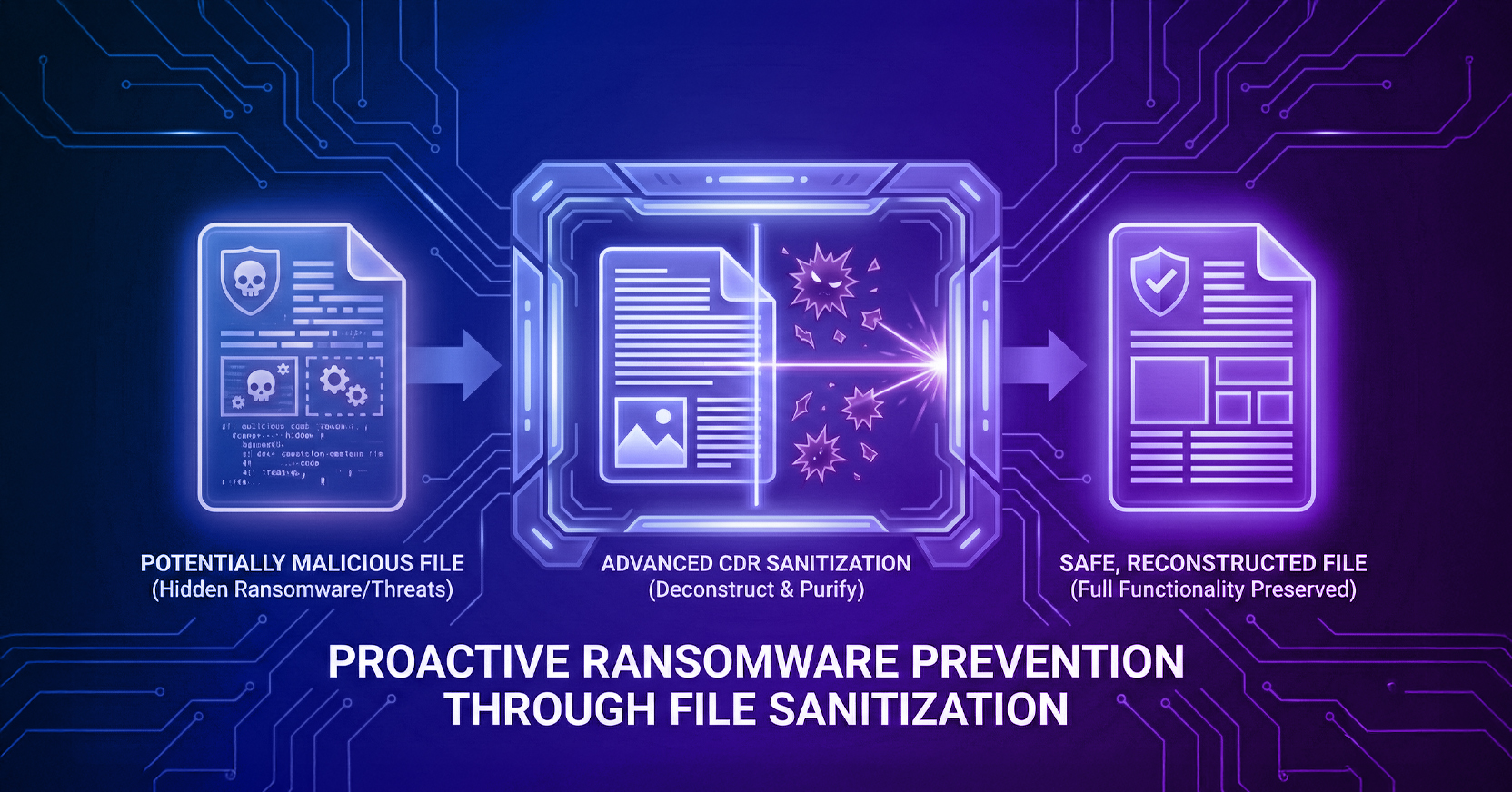
Content Disarm and Reconstruction (CDR), one piece of the overall Menlo File Security solution, provides another approach. This advanced form of CDR deconstructs the file, examines its components, removes unsafe elements, and reconstructs an identical piece of content before delivery. This process sanitizes files while preserving their intended format and functionality whenever policy allows. It’s a near-instant step that removes security intervention while minimizing user downtime.
Menlo’s advanced CDR keeps protection active as content moves between applications, users, agents, and beyond the browser session. Access, threat, and data policies can continue accounting for how the file is received, used, and shared, even when it moves into another channel or workflow.
A file can be safe to open and still contain information that should not be shared. A claims analyst may need a customer report to complete a review, but only a subset of its fields may belong in a partner portal or AI-generated summary. Whether the next action is safe depends on the destination, the data involved, and the purpose of the workflow.
Sensitive data can appear in forms, prompts, copied text, SaaS applications, browser uploads, generated summaries, and automated agent workflows. Endpoint controls may see that a file or browser process is active without understanding the page, destination, identity, or task surrounding the action. That missing context can make it harder to distinguish permitted use from risky exposure.
Menlo’s AI Adaptive DLP inspects information on the page and within the file during interaction. Policy can then respond based on the actor, destination, workflow, action, and data type involved. Depending on the circumstances, Menlo may allow the activity, restrict it, prevent it, or mask only the sensitive fields.
This precision helps protect personally identifiable information, protected health information, payment card data, credentials, and corporate intellectual property. Menlo AI Adaptive DLP can mask sensitive information while leaving the remaining content available for legitimate use. The user or agent can continue the task without accessing data that the workflow does not require.
Threat prevention, least-privileged access, file security, and data protection form a union when they draw from the same session context and coordinate their responses. After all, if one action occurs, such as file sanitization, data masking, or access restriction, that decision should remain visible as the workflow continues. Subsequent controls can then account for what has already happened instead of evaluating each event independently.
If security teams investigate the session described earlier, they should be able to see who or what accessed the application, which device was involved, which pages and content were accessed, which files were moved, what sensitive data was handled, and how each policy responded. That connected record helps an analyst understand the sequence without having to manually assemble fragments from several consoles.
Shared observability also serves purposes beyond incident response. Teams can verify that access and data policies are operating as intended, demonstrate how regulated information was protected, investigate unusual agent behavior, and preserve evidence for compliance reviews. Session context makes the resulting telemetry more useful by showing how individual events fit into the broader workflow.
Menlo Security users have access to a shared management and policy plane - rather than separate capabilities clustered under a common product name. Menlo also complements identity systems, endpoint protection, Secure Access Service Edge (SASE), Security Service Edge (SSE), and security operations tools by connecting these controls at the session level while allowing their context to strengthen the rest of the security architecture.
Browser security works best when the policy follows the complete session. Shared context allows access, threat, file, and data controls to reinforce one another as human users and AI agents move between applications, content, and information. Security teams gain a connected view of the activity while applying policies suited to each actor and workflow.
Menlo Security brings these capabilities together at the session level, helping organizations protect browser-based work without creating fragmented controls or unnecessary disruption.
Schedule a demonstration to see how coordinated protection works across the session.
Key Takeaways
Menlo Security