Your security stack likely includes sandboxing technology. It's been a cornerstone of enterprise defense for years, isolating suspicious files and URLs in contained environments before they can damage your network. But Google's 2026 Zero-Days in Review report reveals a troubling trend: modern attackers are designing sandbox escapes that target the underlying operating system itself, turning your isolation layer into an attack vector.
With 70% of enterprises experiencing at least one zero-day attack in 2025 (ForestVPN, 2025), the question isn't whether sandboxing remains useful — it's whether your current approach provides adequate protection for today's threat landscape.
Sandboxing creates isolated environments where potentially dangerous code can run without affecting your broader system. Think of it as a contained testing ground where your security team can observe suspicious behavior before making allow/block decisions.
Your organization likely uses several types of sandboxing:
Each approach serves a specific purpose in your defense strategy. But they all share the same fundamental limitation: they assume the sandbox itself remains secure.
The benefits of sandboxing are well-established — it prevents known malware from spreading, provides a testing environment for suspicious content, and operates without disrupting normal business operations. But three critical challenges now limit its effectiveness:
The most effective defense strategy combines multiple security controls, with each layer addressing different attack vectors. Sandboxing plays an important role in this approach, but it can't be your only line of defense against sophisticated threats.
This is where Menlo File Security fits into your existing security architecture.
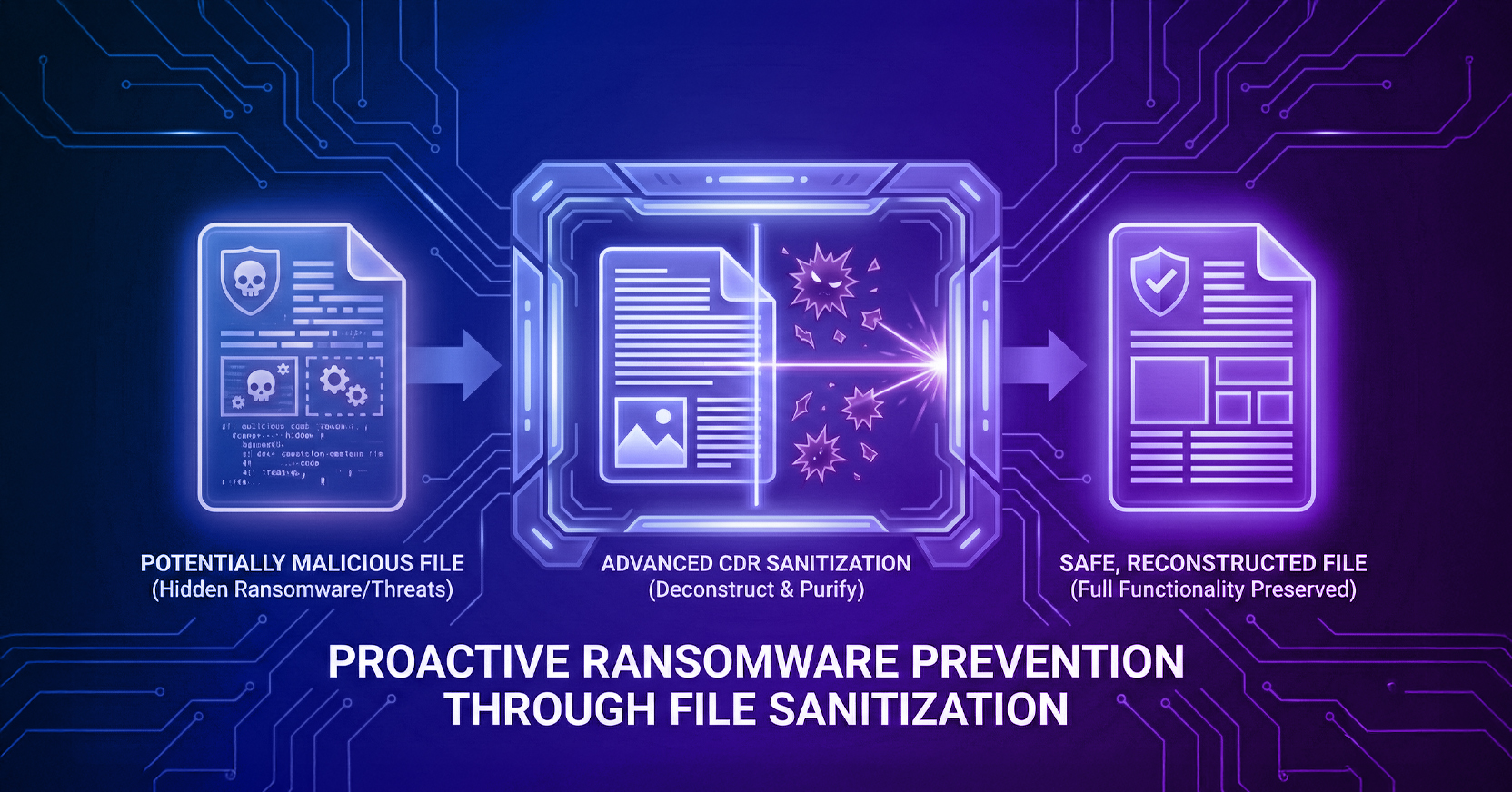
Menlo's approach assumes every file contains potential threats. Instead of detecting malicious behavior after execution, our Positive Selection® technology — Level 3 Content Disarm and Reconstruction (CDR) — deconstructs every file to its core components, strips away potentially harmful elements, and rebuilds a clean version using only verified, safe components. This happens before files ever reach your sandbox environment, reducing the attack surface your isolation tools must defend.
The platform combines four technologies: next-generation CDR, antivirus scanning, hash verification, and traditional sandboxing. While antivirus catches known threats and hash checks identify previously analyzed files, Positive Selection® neutralizes evasive ransomware and zero-day file attacks that would otherwise slip through these defenses.
Unlike standalone sandbox deployments that require weeks of configuration and testing, Menlo File Security integrates with your existing infrastructure in hours, not days. The cloud-based platform uses open APIs to connect with your current email security, web gateways, and file sharing systems.
Once deployed, Menlo operates transparently. Users continue their normal workflows while files get sanitized in real time. Your security team doesn't need to review quarantined items or tune detection rules — clean files flow through immediately, while the rare items that can't be safely reconstructed get flagged for manual review.
This approach reduces your sandbox workload by eliminating the threats that traditional sandboxing struggles to detect and contain. Your existing isolation tools can focus on behavioral analysis of the remaining suspicious items, improving overall detection accuracy while reducing false positive rates.
Sandboxing remains valuable for analyzing suspicious behavior and containing unknown threats. But relying on isolation alone leaves your organization exposed to the sandbox escape techniques that defined 2025's zero-day threat landscape.
A defense-in-depth strategy that neutralizes threats before they reach your sandbox provides better protection with less operational complexity. Your security team spends less time managing quarantined files and investigating false positives. Your users experience faster file processing without the performance impact of deep sandbox analysis on every document.
Most importantly, you gain protection against the zero-day attacks specifically designed to exploit the sandbox infrastructure you've invested in building.
How does sandboxing protect against malware? Sandboxing isolates potentially harmful programs in contained environments, preventing them from accessing system resources or spreading to other network components if they prove malicious.
Can sandboxes stop zero-day exploits? Traditional sandboxes struggle with zero-day attacks designed to escape isolation environments. Google's 2026 Zero-Days in Review report shows that modern exploits target sandbox infrastructure itself, turning isolation tools into attack vectors. A layered approach including Menlo File Security is recommended to close this gap.
What is the difference between sandboxing and Content Disarm and Reconstruction? Sandboxing detects threats by observing suspicious behavior in isolation. CDR assumes every file is potentially malicious, deconstructs it completely, and rebuilds a clean version using only verified components. Menlo's Positive Selection® technology (Level 3 CDR) combines both approaches as part of a defense-in-depth strategy. Read the full guide: A Complete Guide to CDR Technology.
Which file types does Menlo File Security protect? The platform natively inspects and sanitizes over 220 file types, including password-protected archives, Office documents with macros, and PDFs — the formats most commonly used to deliver evasive ransomware and zero-day payloads.
How quickly can organizations deploy Menlo alongside existing sandboxes? Most implementations complete within hours using Menlo's cloud-based APIs. The platform integrates with existing email, web, and file sharing infrastructure without requiring changes to user workflows or endpoint configurations.
About the Author
Sameep Gidda is a Digital Marketing Campaigns Specialist at Menlo Security. Focused on GEO strategy, content marketing, and AI visibility, Sameep works to ensure Menlo's expertise in browser security and agentic AI reaches the security professionals who need it most.
Secure your enterprise file workflows with Menlo Security. Schedule a demo here.
Menlo Security