Secure enterprise browsers (as well as browser isolation, secure web gateways, and related controls) reduce risk while users work. They can isolate web activity, prevent malicious code from reaching endpoints, and enforce access policies for risky sessions. But files behave differently from sessions.
For security teams, the distinction is critical. Browser security governs the activity around the file. File security governs the file itself. When the risk resides within a document, archive, image, or spreadsheet, protection must operate at the content level before that file becomes part of the business workflow.
Security leaders are right to focus on the browser. It’s where employees access SaaS applications, research information, collaborate with partners, and move business forward. That shift has made enterprise browsers, isolation, secure web gateways, and secure access tools a natural part of the modern security conversation.
But there is a dangerous assumption hiding in that conversation: that protecting the browser session also protects the information moving through it. Particularly, the files.
Browser security and file security solve different parts of the same problem. While browser security controls the session: access, activity, and exposure from web-based threats, file security controls the documents, spreadsheets, archives, images, and records that move through those sessions.
For instance, a document may enter through a protected browser, then get opened locally, forwarded to a colleague, uploaded to cloud storage, attached to an email, or reused in another workflow. A possibility that keeps security leaders up at night.
So, while browser security is capable of a lot, it doesn’t automatically make file content safe.
Employees are not opening random objects in isolation. They are reviewing invoices, contracts, claims documents, reports, resumes, presentations, forms, images, and archives because those files are tied to work that needs to get done.
That everyday trust is exactly what makes files attractive to attackers. A file does not need to look suspicious to be dangerous. Risk can hide inside the structure of a document, the macro logic in a spreadsheet, an embedded object in a presentation, a malformed image, a script inside an archive, or active content buried in a file that appears routine. The user sees a business document. The attacker sees a delivery mechanism.
File-borne threats are especially difficult for detection-based tools to catch. A known malicious file may be blocked. A suspicious file may be quarantined. But unknown, modified, or zero-day threats are designed to avoid recognition until someone opens the file or an application processes it. By then, the attack may already have a target. In more serious cases, that hidden payload can lead to malware execution, ransomware activity, spyware, rootkits, or the exposure of sensitive data. Which is why security leaders still require a zero trust approach to file security.
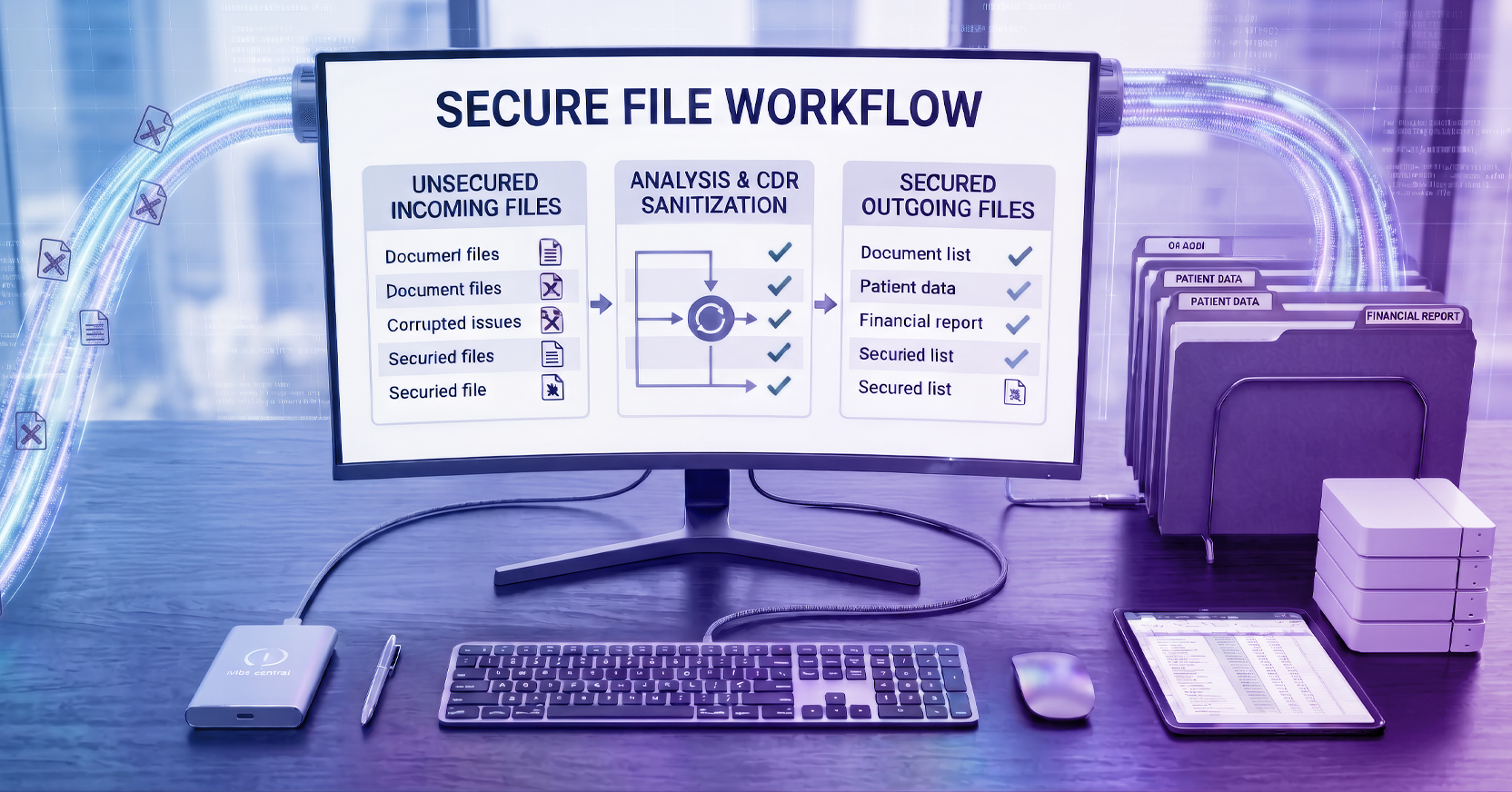
Content Disarm and Reconstruction, or CDR, is an approach that addresses problems at the file level. Rather than treating a file as safe because the session was protected, CDR treats the file content as requiring sanitization before use. Depending on the approach, it can flatten files, remove active content, or cleanse malicious code while preserving the usability employees need.
While detection-based tools, like antivirus, are built to recognize threats, CDR reduces the attacker’s opportunity to execute by sanitizing the file before use, so the business does not have to depend on a user making the right decision, a sandbox reaching the right verdict, or a signature catching up to a new technique.
However, as we alluded, not all CDR approaches provide the same experience. Some legacy methods make files safe by flattening them into static PDFs or stripping out broad categories of active content. That can reduce risk, but it can also remove functionality employees need, including macros, embedded objects, forms, formatting, or file structures that support everyday work. When security breaks the file, users either lose productivity or look for a workaround.
Advanced CDR, which is included in Menlo’s File Security solution, takes a more practical path. Menlo File Security sanitizes files in real time across more than 200 file types, protecting users from known and unknown file-borne threats while preserving usability wherever possible. The goal is to give users a safe, functional file so work can continue, without defaulting to broad blocking or quarantine.
The file gap is not limited to malware. Files also carry the data that organizations are most responsible for protecting.
A spreadsheet may contain customer records. A claims document may include protected health information. A contract may include financial terms, employee data, payment details, or proprietary business information. These files move through the same everyday workflows as everything else: downloaded from portals, uploaded to SaaS applications, shared with partners, attached to emails, and stored in collaboration platforms.
That creates a second layer of risk. Even if browser controls govern who can access an application or what happens during a session, sensitive content can still be embedded in the file itself. If that content is not identified, controlled, masked, or sanitized, compliance exposure can flow through normal business activity without appearing to be a security incident at all.
File security functions as both a threat-prevention control and a data-protection control. Menlo File Security extends protection beyond malicious content by helping organizations detect sensitive information inside files and reduce exposure before that data reaches the wrong destination. When sensitive data such as PII, PHI, PCI, financial records, or proprietary information is identified, policies can be applied in real time to mask or control that content while work continues.
That matters for regulated organizations because compliance does not only fail in obvious places. It often fails in routine file movement: the report shared too broadly, the document uploaded to the wrong app, the attachment sent to an unauthorized recipient. File security reduces that risk at the content level, helping organizations protect against both hidden threats and sensitive data exposure.
Security leaders do not need another isolated tool to manage. They need controls that follow how people actually work: across browsers, SaaS applications, shared files, external portals, collaboration platforms, and cloud storage.
Together, browser and file security connect session-level control with content-level protection for the files users are downloading, uploading, creating, and sharing.
That integration matters. Without it, teams often rely on separate controls for browser activity, malware scanning, data loss prevention, quarantine, and incident review. Each handoff creates room for delay, inconsistency, or missed context. An integrated approach reduces risk without adding steps for users or forcing analysts to reconcile disconnected signals.
It also makes file protection more useful over time. Threat and privacy analytics can reveal targeted users, risky file types, exposed workflows, and policy gaps. Those insights help security teams move from one-off prevention to continuous improvement.
The result is file security that protects content in motion, supports how employees work, and gives security teams the visibility they need to keep reducing risk.
Menlo Security