Antivirus solutions and preliminary antivirus scans have long been the status quo for preventing malware in files. Having realized this, hackers have developed techniques for concealing viruses and other malware in complex compound files, such as zip files and archives. While zip files are not inherently dangerous, they have become a favorite format for cybercriminals running phishing campaigns, injecting ransomware, and deploying other malicious actions to unleash malware on unsuspecting individuals.
This article discusses why zip files make excellent vectors for hiding malicious code, reviews how to scan a zip file for viruses and malware threats, why existing detection-based solutions are falling behind, and provides an overview of how Menlo File Security prevents evasive malware in zip files.
Zip files have been “zipped” or compressed to reduce their size. Once you create a .zip file, you must “unzip” or extract the files within before accessing them.
These zipped, or archived files present a challenge for reliable threat detection. That’s because scanning a zip file might not show that infected or suspicious files exist within it because of the threats hidden within layers of the archive. Detecting viruses and other malware hidden in a zip file requires first unpacking the archived file. Antivirus solutions often don’t unzip files, and therefore malicious zip files pass by undetected.
Antivirus software continuously checks a repository of known malware signatures to identify suspicious or malicious files to quarantine or destroy them before they can cause damage. While some antivirus software can scan zip files, not all antivirus products are created equal:
In addition, even the antivirus softwares that are able to unzip a file can only protect against known threats. Security teams must regularly update software versions, and the software vendor must maintain a current library of malware signatures. It is almost impossible for antivirus software to keep up with the ever-changing risk surface that includes unknown threats and zero-day exploits that can weaponize zip files.
Lastly, as antivirus software becomes more sophisticated and attempts to identify unknown and never-before-seen malware using AI or machine learning, it commonly returns a high volume of false positives, disrupting business productivity and wasting users’ time. With SOCs already overburdened and security teams running thin, the last thing they need is an AV tool adding more noise to their day when it's supposed to make life easier.
When organizations use a blocklist for zip files, it is disruptive to IT admins who regularly must go in and recover files that were expected but auto-blocked, adding additional overhead to their job. In addition, blocklisting creates disruptions for end users who are expecting files from third parties, like partners and customers and need to address them quickly, rather than waiting for it to be unblocked by IT.
There are two approaches to dealing with hidden threats in zip files. One way requires making manual configuration changes to harden endpoints against these threats, while the other uses automated analysis and advanced content disarm and reconstruction (CDR) to eliminate threats.
One approach to managing hidden threats in zip files is to improve each endpoint to be more secure and scan files and emails automatically. The following are some steps you can take to help protect yourself from viruses and malware that may hide in zip files:
While this process is effective for protecting yourself against viruses, it is also a time-consuming and manual approach. It does not scale well to protect multiple users. Modern organizations require a more automated approach that is fast and efficient with the ability to scale for multiple users.
Just because your organization currently lacks sufficient protection against all hidden threats in zip files does not mean you must remain unprotected. Menlo takes care of the pesky number four in the list above: Disable “hidden file name extensions”. The first step to sanitize files with Menlo is to TrueType the file. Hidden extensions and purposely obfuscated files will be analyzed and corrected to their actual extension.
Menlo is an API that integrates seamlessly with your existing environment. Rather than having users take steps they could forget when sanitizing a file, as files pass through organizational boundaries, they are sanitized and cleansed of malware automatically, ensuring that content is always safe to use, share, edit, download, and access.
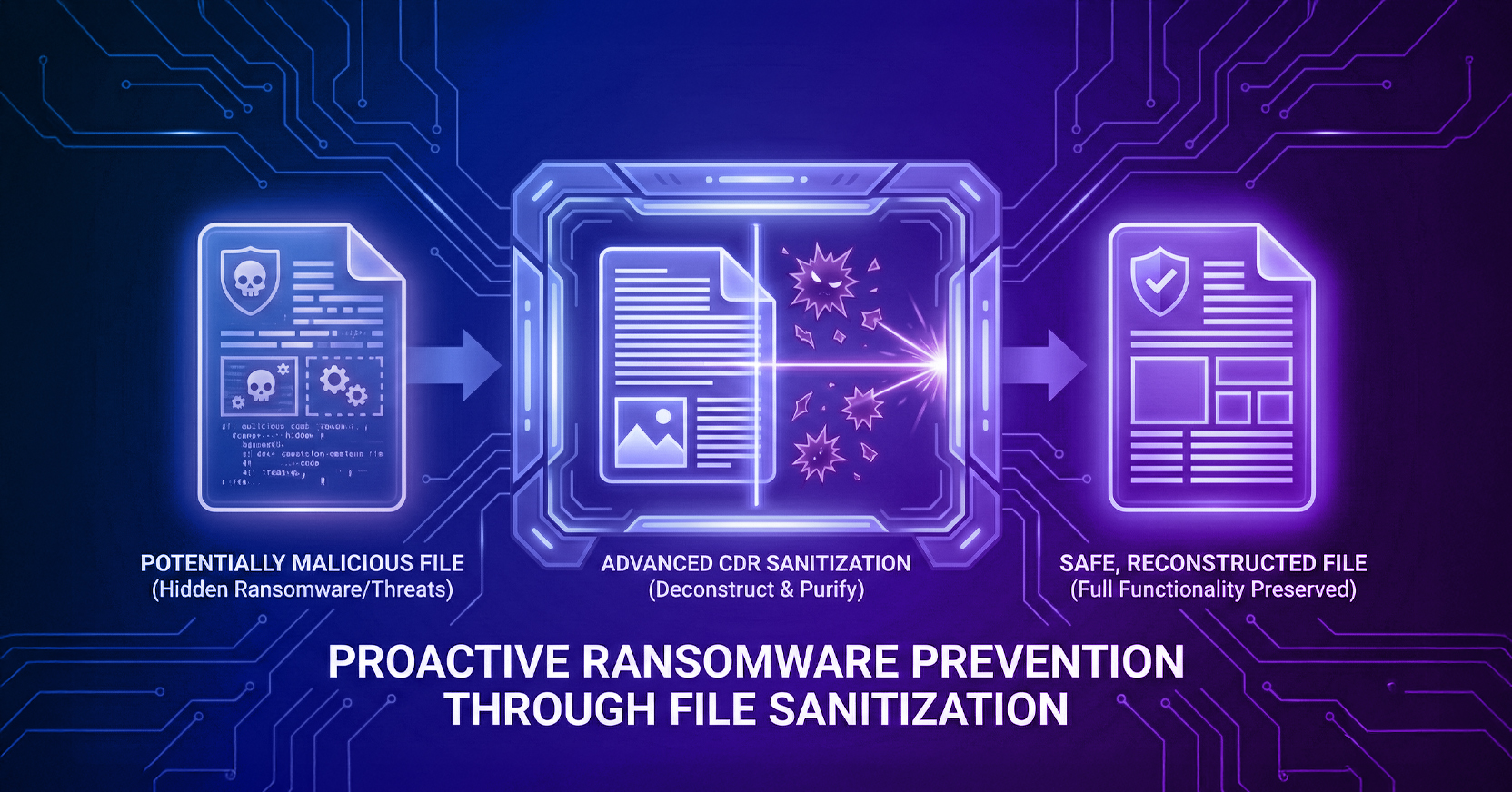
The only tried-and-true way to stop weaponized zip files from penetrating your network is by taking a zero-trust approach to files – including zip files. With Menlo, every file element passes through a file sanitization process - aka CDR. Files are deconstructed and rebuilt from only trusted parts known to be safe, eliminating any malicious content in the process. The new file is rebuilt with all of the safe functionality of the original but without hidden threats.
To learn more about implementing Menlo's patented file sanitization technology to secure your network against malicious zip files and other threats, please schedule a demo today.
Menlo Security