Menlo Securityは、GigaOm RadarのZTNA部門でリーダーおよびアウトパフォーマーに選定されました
Icon Rounded Closed - BRIX Templates

Browsing Forensics Delivers Actionable Information, Not Just More Clues

One-Click Access to Everything You Need to Know About Browser Activity

Two IT specialists intensely looking at a computer screen

Real Answers, Not Ambiguity

In the past, IT security, compliance, and audit teams have struggled to reassemble browser activities following a potential security incident. They can’t, for example, see how users and groups interact with applications or threats like zero-day phishing or ransomware, and they can’t see how users are accessing internal applications. They cannot see how users are interacting with GenAI tools, making it difficult to troubleshoot access. That's because traditional network, security, and endpoint tools can't see what's happening inside the browser and thus:

By the time teams can parse information from logs or cobble together “clues” from disparate tools in the security stack, it’s often too late. Servers could have been infected, valuable data may have been leaked, or a single successful phishing attack might have matured into enterprise-wide ransomware. 

The same is true for users accessing internal or SaaS apps. By the time you become aware of inappropriate access, it can be too late. Your teams need real insight into browsing.

Menlo Browsing Forensics
Know the Who, What, and How of Security Incidents

Get to the Bottom of Any Incident with Greater Speed and Better Intel

Security, IT, and compliance teams have struggled for years trying to discover exactly what happens in browsing sessions. From security breaches that began with a user clicking on a phishing link to user application access that should have been revoked, there has been no way to get definitive proof of exactly what occurred inside the user's browser. That ends with Menlo Browsing Forensics.

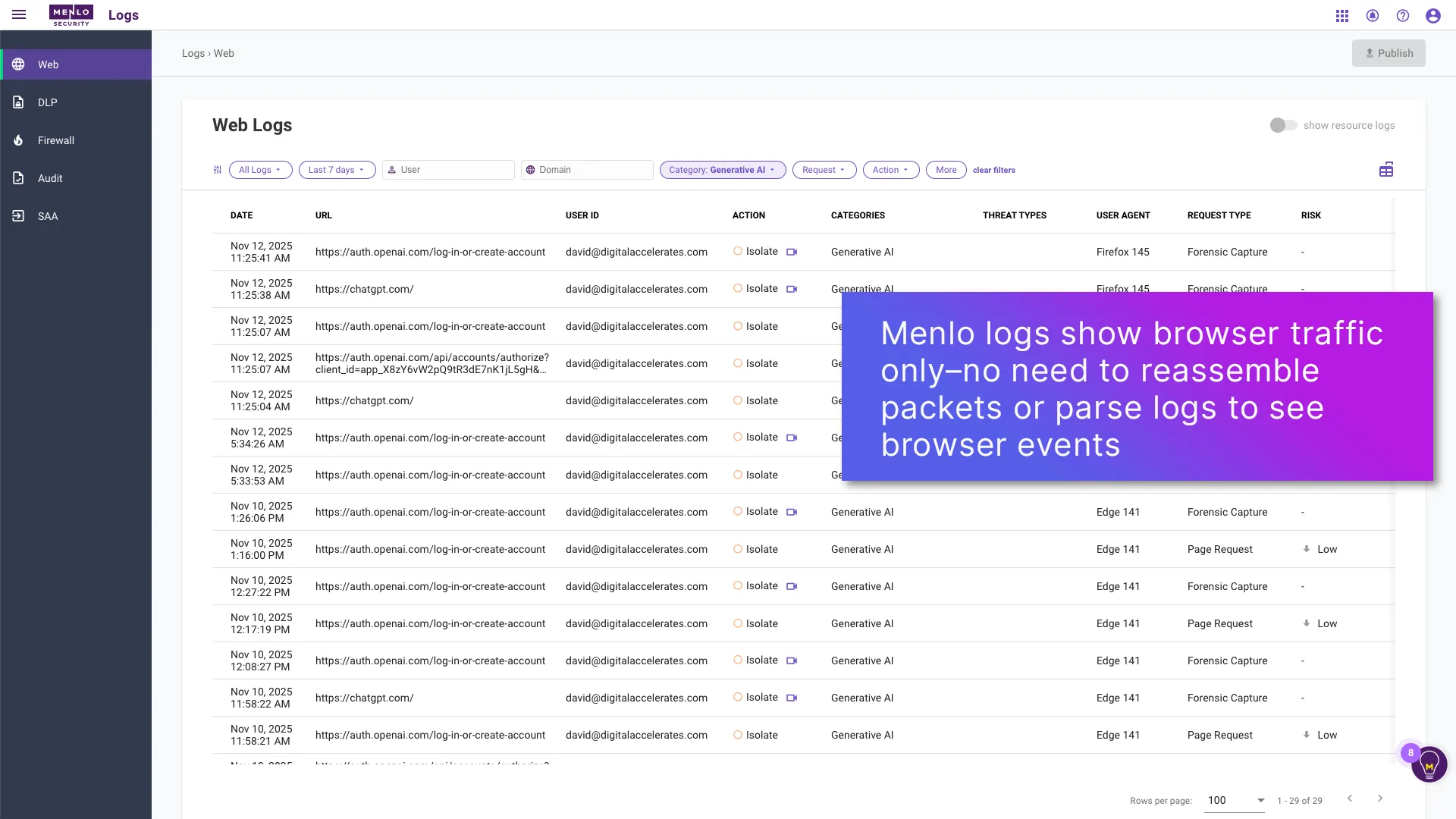
  1. As traffic passes through the Menlo Cloud, Menlo captures browsing traffic only
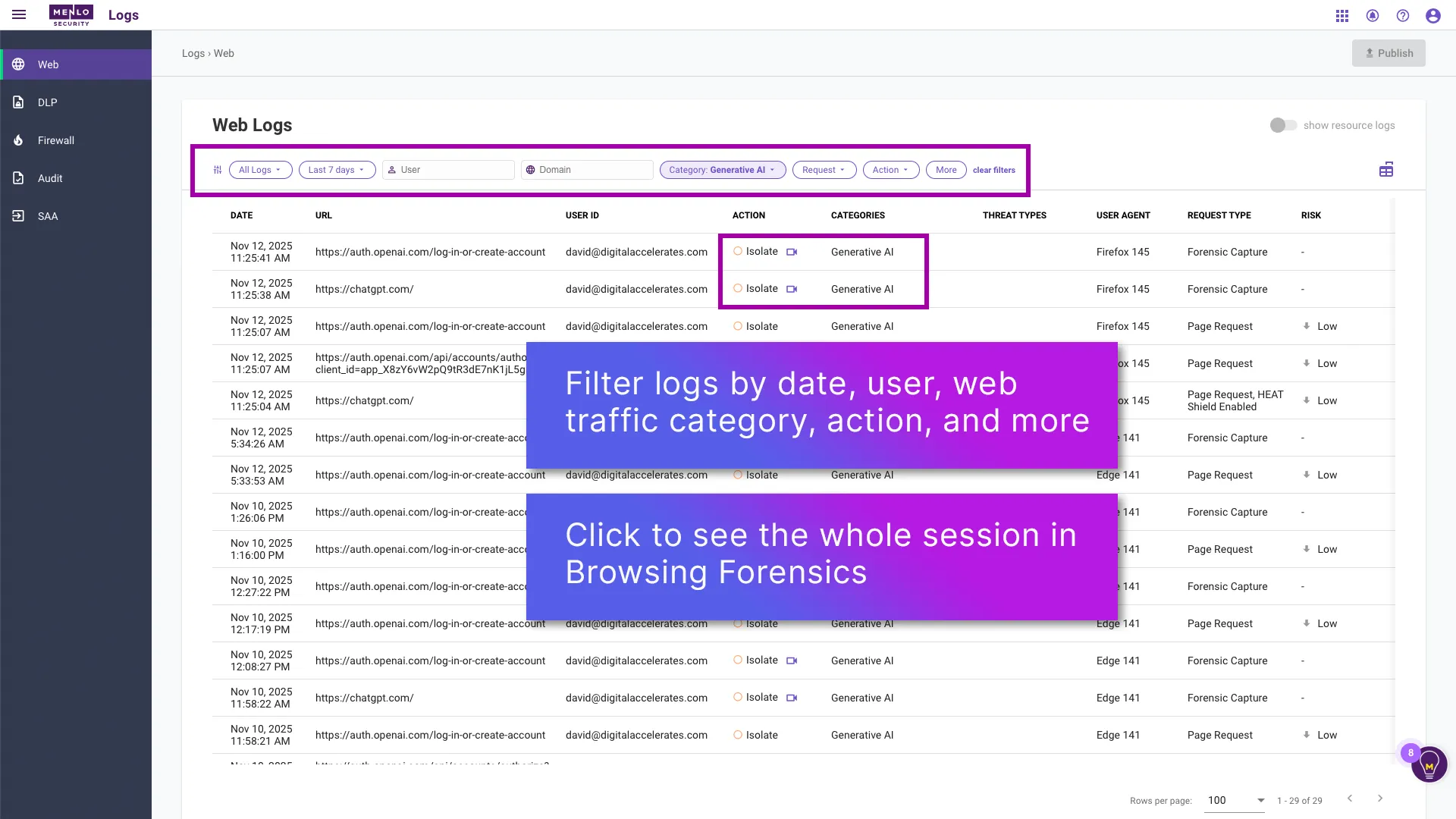
  2. From the browser logs, filter to exactly what you want to see. Click the Browsing Forensics icon for more detail
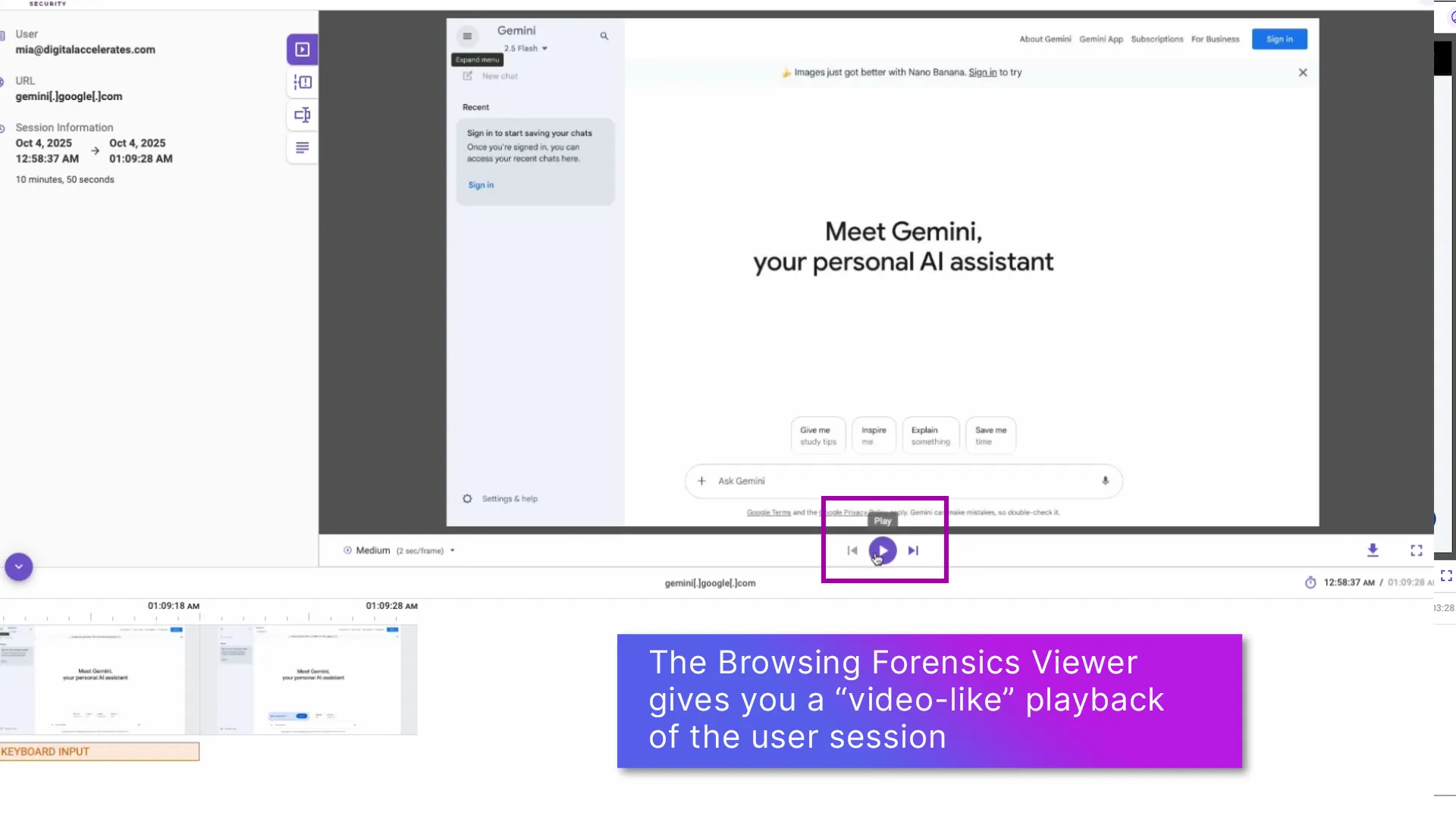
  3. Browsing Forensics Viewer gives you a "video-like" view of user actions
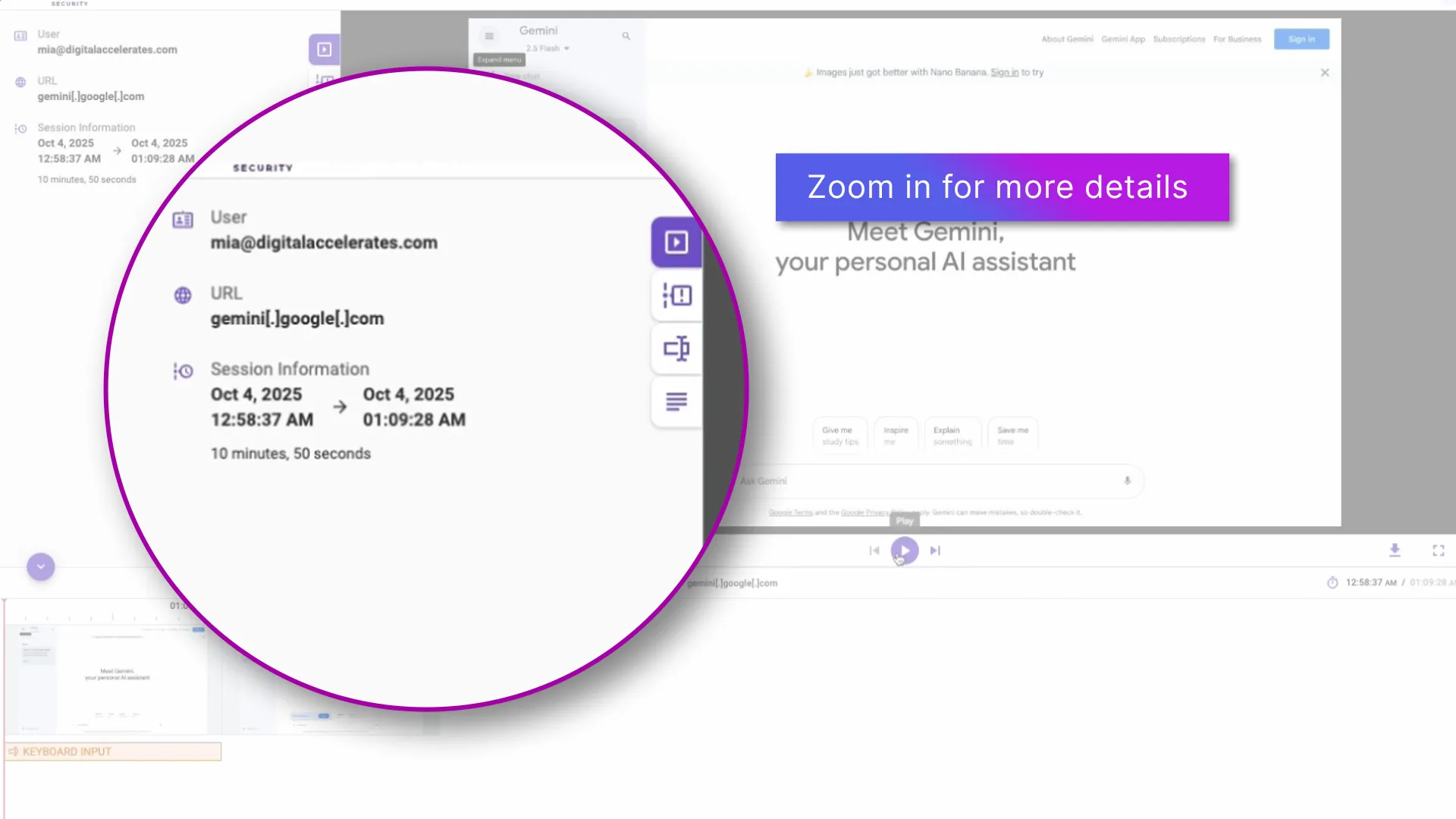
  4. Zoom in for more details
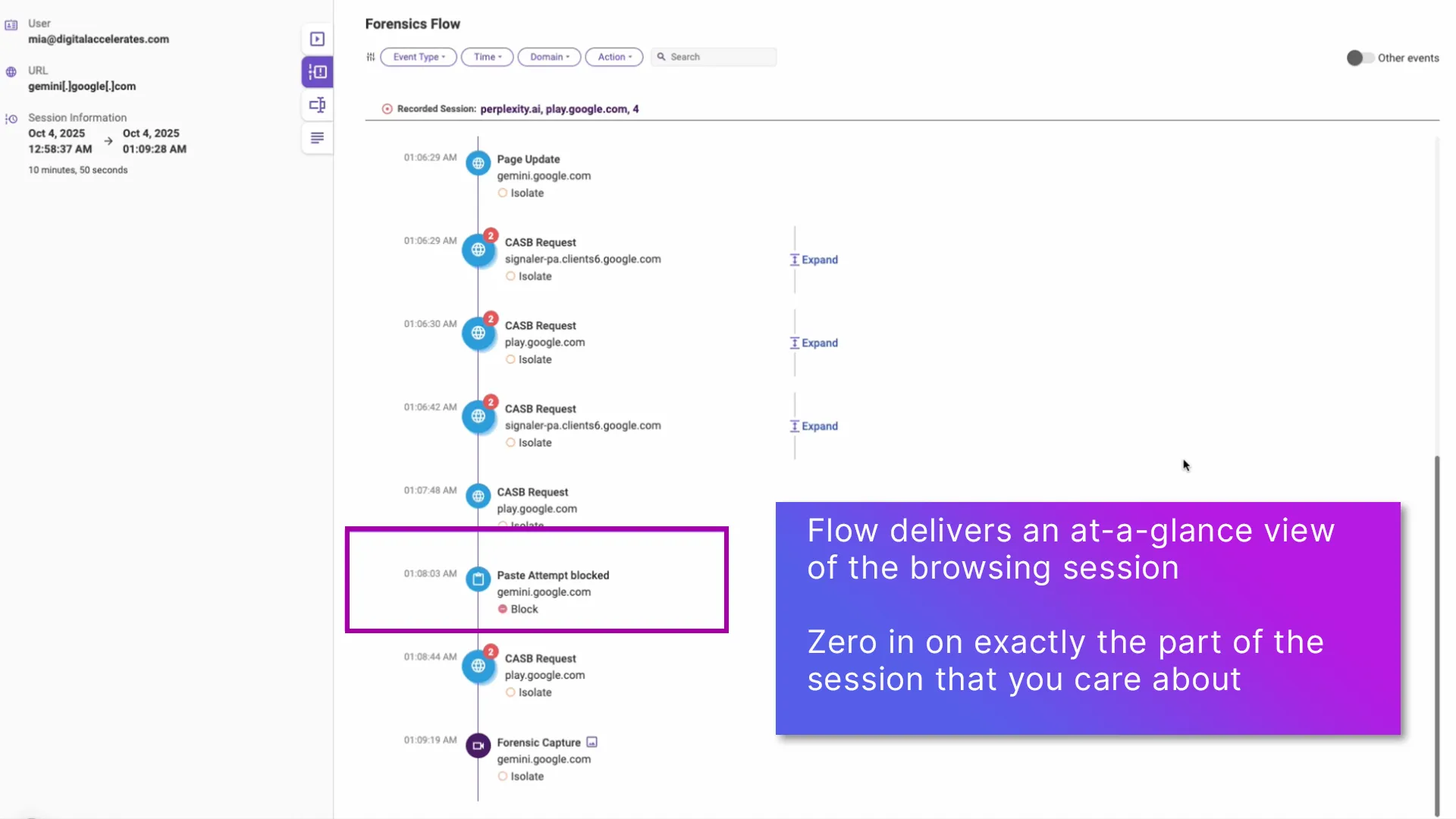
  5. The unique Browsing Forensics Flow feature gives you an at-a-glance view of the whole session

With Menlo Browsing Forensics, you can get the details you need to ensure that your data is protected, threats are analyzed, GenAI guardrails are working, and application access policies are functioning as they should. All while you maintain complete security and control.

1. Browser Traffic Logs

screenshot of the Menlo Security UI displaying DLP (Data Loss Prevention) logs. The table, titled 'Browser Traffic,' shows blocked user actions on sites like ChatGPT, with an overlay explaining that Menlo logs browser events directly without needing to reassemble packets.
スライダーナビゲーションの左矢印
スライダーナビゲーションの右矢印
スライダーナビゲーションの右矢印
スライダーナビゲーションの左矢印

2. Filter and Interact with Browser Logs

"A screenshot of the Menlo Security UI showing the 'Web Logs' page, titled 'Browser Logs.' The image highlights the platform's advanced filtering capabilities, showing text overlays that state you can 'Filter logs by date, user, web traffic category, action, and more' and 'Click to see the whole session in Browsing Forensics.'"
スライダーナビゲーションの左矢印
スライダーナビゲーションの右矢印
スライダーナビゲーションの右矢印
スライダーナビゲーションの左矢印

3. Browsing Forensics Viewer

Visually reconstruct user sessions in ChatGPT with Menlo Security's Browsing Forensics. See how users interact with GenAI and test DLP policies with full session playback for clear investigation and compliance evidence.
スライダーナビゲーションの左矢印
スライダーナビゲーションの右矢印
スライダーナビゲーションの右矢印
スライダーナビゲーションの左矢印

4. Browsing Forensics Viewer

A screenshot of the 'Browsing Forensics Viewer' interface, demonstrating its session replay capability. The image shows a playback of a user's screen, with a large magnifying circle zooming in on a web dashboard to emphasize the 'Zoom in for More Details' feature.
スライダーナビゲーションの左矢印
スライダーナビゲーションの右矢印
スライダーナビゲーションの右矢印
スライダーナビゲーションの左矢印

5. Browsing Foresnics Flow

"A screenshot of a security platform's 'Browsing Forensics Flow' UI. The image shows a visual timeline of a user's browsing session, with a specific 'Paste attempt blocked' event on gemini.google.com highlighted. A text overlay explains that this flow provides an 'at-a-glance view' of the session, allowing admins to 'zero in on exactly what you care about.'"
スライダーナビゲーションの左矢印
スライダーナビゲーションの右矢印
スライダーナビゲーションの右矢印
スライダーナビゲーションの左矢印

The unmatched visibility that Browsing Forensics provides come from the unique Menlo architecture. All browser requests and actions are executed in the Menlo Cloud, isolating the user from threats and protecting internal apps and data.  As the traffic passes through the Menlo Cloud, you can record the details of session activities. That means that you can derive actual user intent based on their actions, rather than guesswork, and act accordingly. All Browsing Forensics sessions are instantly sent to your choice of encrypted storage to protect security and privacy; Menlo does not retain these recordings, or have any ability to view them.

Learn More About How Browsing Forensics Can Help You

Browsing Forensicsのエグゼクティブブリーフ
Get the vital information that your security, incident response, and compliance/audit teams have been missing.
ソリューション概要をお読みください
Get Immediate Visibility into Browsing Sessions
When a security event occurs, you’re often left guessing how it happened. Menlo Browsing Forensics delivers details about what users did while browsing, including their keyboard inputs and even the page resources.
製品ツアーを見る
Is Your Browser Your Biggest Security Blind Spot?
Without clear insight into browser sessions, threats like ransomware and phishing can bypass defenses. In this video, you’ll see how Menlo Protect provides the critical visibility and AI-powered protection needed to neutralize these threats before they can do damage.
Watch Protect and Browsing Forensics Video
Agentless Access to Your Critical Applications
VDI's high cost and complexity are forcing organizations to find a better way to provide remote access. This video shows a simpler, agentless alternative that isolates threats to protect your critical applications and network from harm.
Watch Secure Application Access Video

See Inside Threats, Ensure Application Access Compliance, and Secure GenAI

When You Can See Browsing Activities, You Can Secure Them

By adopting a cloud-native application access architecture, organizations gain proven security assurance while dramatically reducing operational complexity and capital expenditure.

Product Illustration for Browsing Forensics

See the Threats Targeting the Browser and Stop Them

Browser-based threats are increasingly sophisticated, exhibiting dynamic behavior known as highly evasive and adaptive threat (HEAT) attacks. Menlo Browsing Forensics empowers security teams with the visibility that has been missing, providing full visibility into user behavior during attacks (like phishing), capturing credentials entered, and recording page resources. This data allows threat hunters to analyze attacker methods even after malicious sites go offline, providing the intelligence needed for incident response and regulatory compliance.

The average cyberattack, once discovered, can take days or weeks to identify and contain.

With Menlo Browsing Forensics, you can see what actually happened during the earliest stages of the attack, giving you vital information about what to protect and the extent of user involvement.

Enforce Application Access Control Rules

As application access moves to the browser, it is essential to have control and visibility. Menlo Secure Application Access lets you tailor precise rules, and Browsing Forensics surfaces actual user sessions, to ensure that policies are adhered to. The combination is invaluable in a variety of situations, including VPN replacement, VDI reduction, BYOD security and zero trust access.

With Browsing Forensics, you can see actual user activity for all users, even third parties and users on BYOD. That means you can see the effect of policy decision in near real time, making it easy to tailor access rules based on evidence.

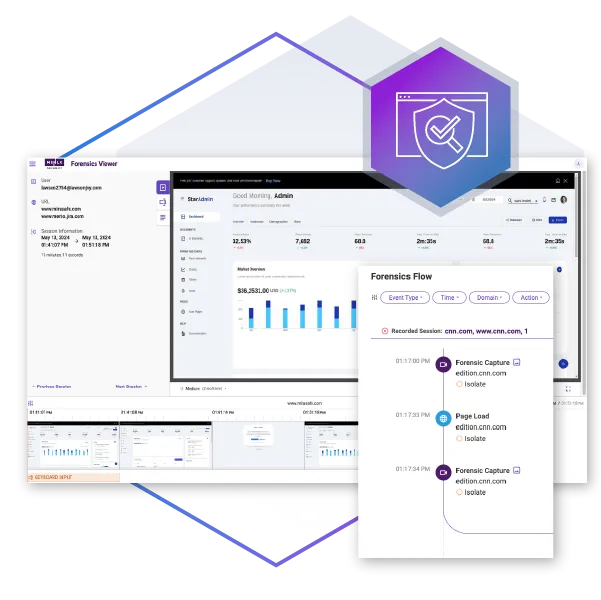
A screenshot of the Menlo Security 'Forensic Viewer' dashboard, which demonstrates application access control and user activity monitoring. The interface displays data on user sessions, security policies, and 'Browsing Forensics' to provide visibility and enforce zero trust access rules.
Dashboard screen showing Gemini, a personal AI assistant with Forensics Flow log of activity requests and security shield icon.

Get Visibility into GenAI Use

GenAI lives in the browser, and with Menlo, you can secure it there. Beyond establishing access controls, it is vital to be able to view user sessions to ensure that policies are working as they should be. With Browsing Forensics, you can easily see the GenAI tools that are in use, get an at-a-glance view of overall activities, tailor policies with proof, and base audit responses on evidence, not guesswork.

See how users are actually working with GenAI tools, including vendor and user actions in sessions. Browsing Forensics can be set to trigger on traffic type, DLP violations, and more, so you can be sure that users are acting in accordance with policy and that data loss is being prevented.

Menloがブラウザのセキュリティ保護に重点を置いている理由は、ほとんどの業務はブラウザ上で行われるから

レガシなセキュリティツールでは阻止できない攻撃を防ぎ、企業を保護し、アプリケーションへのセキュアアクセスを可能にするMenlo Securityが、世界中の組織から信頼されている理由をご覧ください。

「Menloは簡単に展開でき、クラウド内のセキュリティおよびテクノロジースタックとうまく統合できました。」

アレックス・オーイ

デジタル・ナショナル・バーハッド(DNB)最高情報セキュリティ責任者

「従業員にとって、Menloは完全に透明性が高く、ユーザーは完全に機能するWebリソースをナビゲートできます。」

プレミアミトン

英国を拠点とする投資管理会社

「... Synapxeは、ネイティブユーザーエクスペリエンスに影響を与えることなく、悪意のある脅威から資産を保護できます。」

シナプス

シンガポールヘルステックエージェンシー

「作業速度を落とすことなく、Web ベースの脅威からユーザーを保護できる、階層化されたアプローチが必要でした。」

デイン・ジーリンスキー

ジェイコブソン・ホールディングス情報セキュリティ・マネージャー

「このプラットフォームのおかげで、修正の必要性が減り、パッチの負荷も軽減されました。」

アラン・ゴー

M1コミュニケーションズ最高情報責任者

「Menlo Securityは、感染を検出して駆除するだけでなく、マルウェア感染の可能性を排除するのに役立ちました。」

関口耕一

東京海上ディーアール株式会 ICT企画ユニットリーダー

「以前は、潜在的なマルウェアの問題をすべて手作業で調べなければなりませんでした。今では、Menlo セキュアクラウドブラウザのおかげで、私の仕事はずっと簡単になりました。」

フランソワ・ガッサー

ゲスゲン原子力発電所 IT セキュリティ責任者

「Menloは、インターネット上で蔓延している未知のリスクをすべて処理します。」

トップクレジットカード発行会社

シニアサイバーセキュリティアーキテクト

「ゼロクライアント、簡単なスケーリング、クラウドプロビジョニングとアプライアンスの比較。」

カール・ケンプ

情報セキュリティ責任者

「Menlo Secure Cloud Browserは、世界中のユーザーが同じように透過的なエクスペリエンスと揺るぎない保護を実現するためのスケーラビリティを提供しました。」

MTRコーポレーション

「[Menloは] ますます分散するITインフラストラクチャ全体にポリシーを手動で適用および更新する必要をなくしました。」

フォーチュン100の金融サービス会社

「Menloは、ユーザーのネイティブメールエクスペリエンスに影響を与えることなく、リンクや添付ファイルに埋め込まれたメールベースのマルウェアから保護します。」

フォーチュン50グローバル投資会社

Browser Visibility Made Easy

Whether you are enforcing policies around the use of GenAI, investigating a security incident, or looking at application access by users, Browsing Forensics makes it easy to see exactly what happened, with features that include:

A security analyst intensely focused on her laptop, representing the deep visibility needed to view user activities in near real time. The image symbolizes how modern forensics tools eliminate guesswork and provide clear proof during incident investigations

View User Activities in Near Real Time

Security and IT teams have long struggled with browser-based incidents, like phishing attacks preceding ransomware, often wasting time on reactive, manual steps like reconstructing packet captures, combing through SIEM/SOAR logs, and relying on interviews with users who can't recall the event. Browsing Forensics eliminates this costly guesswork, giving security and IT teams a one-stop shop to get the visibility they need in near real time by instantly viewing the complete session in question and watching full user interactions via a video-like interface.

  • See the complete session in question at a glance
  • Look at full user interactions via a video-like interface

With Browsing Forensics you have a one-stop shop to get the details you need, in near real time.

Learn About Menlo Protect with HEAT Shield AI and Browsing Forensics

See Inside the Mind of Attackers

As attackers target the browser with sophisticated threats, the page that launched the attack is often gone by the time a security alert surfaces. This forces threat hunters to pull archived session copies, harvest indicators from threat intelligence, correlate DNS and hosting records, analyze phishing kits, and attempt to manually rebuild the entire attack session. Browsing Forensics eliminates this guesswork by capturing all page resources at the exact moment the threat is identified, providing threat teams with real-time visibility and actual information correlated to the threat. Security professionals can see an attacker's Tactics, Techniques, and Procedures (TTPs), enabling them to proactively prevent further damage.

Learn More About Browsing Forensics

A threat hunter intently analyzes a security event, representing the ability to 'see inside the mind of an attacker.' The image symbolizes how browsing forensics provides real-time visibility into an attacker's Tactics, Techniques, and Procedures (TTPs)
A compliance officer reviews user session recordings on a futuristic display, representing the deep visibility needed to ensure policy and regulatory compliance. The image symbolizes how browsing forensics provides definitive evidence to satisfy audit requirements.

Ensure Policy and Regulatory Compliance

Ensuring policy and regulatory compliance for remote, BYOD, and third-party users is challenging. While they need access to internal resources, the lack of browsing session visibility makes their actions unclear. Browsing Forensics solves this by providing actual user session recordings, so security and IT teams can ensure access precisely matches policy, adjust controls as needed, and easily generate the definitive evidence required to satisfy audit requirements.

Learn About Menlo Secure Application Access with Browsing Forensics

よくあるご質問

心の中の燃えるような質問への答え。

別の質問がありますか?
お問い合わせ
White rounded Arrow pointing Up to the right diagonaly
What is Menlo Security Browsing Forensics?
Violet Plus Mark

Menlo Security Browsing Forensics, enabled in the Menlo Cloud, provides visibility into user browsing behavior and actions. It captures policy-defined browsing sessions to assist security, incident response, and compliance teams in investigating security incidents, compliance issues, and other events.

Does Menlo retain session recordings?
Violet Plus Mark

No, we do not. Browsing Forensics captures are automatically ported to the customer’s choice of storage. Menlo does not retain them or have any access to them.

What kind of information can be captured by Browsing Forensics?
Violet Plus Mark

Menlo Browsing Forensics captures a wide range of content from a user's web activity. This includes visual data, such as screen captures of the entire browsing session, as well as specific user inputs, like keystrokes and credentials typed into forms. Additionally, it records the underlying page resources, which consist of the essential components that build the webpage, such as its JavaScript, CSS, and HTML code.

How is Browsing Forensics different from traditional security tools?
Violet Plus Mark

Traditional network or endpoint security tools often lack visibility into browsing sessions, leaving security teams to guess what happened based on fragmented clues. Browsing Forensics provides definitive proof by capturing and recording the actual user actions, eliminating the ambiguity and guesswork that comes with traditional methods.

Menlo Securityが実現する「保護」の全貌

Self-Guided Tour

製品ツアーで、Menlo製品がセキュアなアプリアクセスを可能にし、巧妙な攻撃をブロックし、ブラウジングセッションに関する重要な洞察を提供する仕組みをご確認ください。

製品ツアー

Menlo Securityが実現する「保護」の全貌

Menloが組織それぞれ独自のセキュリティ課題を解決するためにどのようにカスタマイズできるかをご覧ください。それぞれの担当チームの目標に合わせてカスタマイズされたデモをご用意し、現在のスタックをセキュアにし、ユーザーを保護する方法をご案内いたします。真にセキュアなブラウジングエクスペリエンスをワンクリックするだけで実現できます。

デモの予約
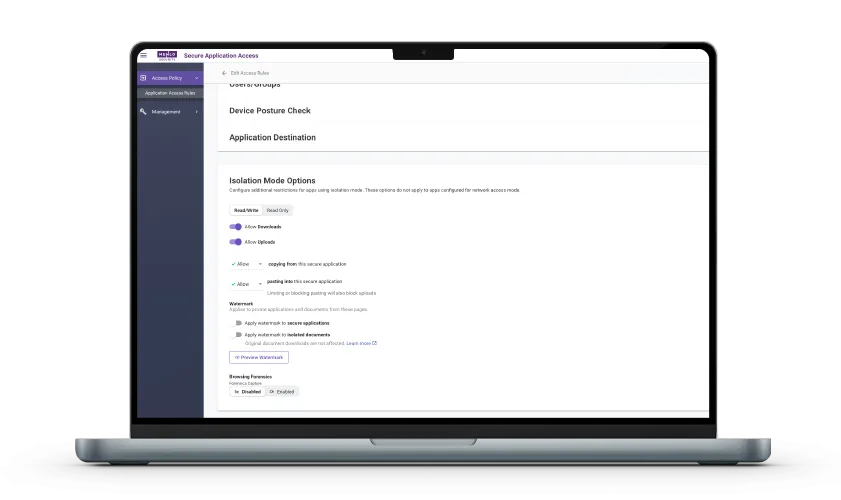
Mac laptop with Menlo Secure Application Access UI on screen